# Updating Maps [MAC]

### <span style="text-decoration: underline;">Map Updates</span>

Map updates are released each year and older versions become discontinued.

<p class="callout danger">To update your card it must be registered in your account. Updates are shown under your existing registered product.</p>

<p class="callout danger">Updates are available FREE for 60 days after registration. Not Registered Yet? [Register Here](https://backroadmapbooks.com/account/register)</p>

### <span style="text-decoration: underline;"><span data-slate-fragment="JTVCJTdCJTIydHlwZSUyMiUzQSUyMnAlMjIlMkMlMjJjaGlsZHJlbiUyMiUzQSU1QiU3QiUyMnRleHQlMjIlM0ElMjJMb2clMjBpbnRvJTIweW91ciUyMGFjY291bnQlMjAlNDAlMjBodHRwcyUzQSUyRiUyRmJhY2tyb2FkbWFwYm9va3MuY29tJTIyJTdEJTVEJTdEJTVE" style="white-space: pre;">**Connecting your GPS**</span></span>

*<span data-slate-fragment="JTVCJTdCJTIydHlwZSUyMiUzQSUyMnAlMjIlMkMlMjJjaGlsZHJlbiUyMiUzQSU1QiU3QiUyMnRleHQlMjIlM0ElMjJMb2clMjBpbnRvJTIweW91ciUyMGFjY291bnQlMjAlNDAlMjBodHRwcyUzQSUyRiUyRmJhY2tyb2FkbWFwYm9va3MuY29tJTIyJTdEJTVEJTdEJTVE" style="white-space: pre;">**Some units may need to be placed into:**</span>*

> <span data-slate-fragment="JTVCJTdCJTIydHlwZSUyMiUzQSUyMnAlMjIlMkMlMjJjaGlsZHJlbiUyMiUzQSU1QiU3QiUyMnRleHQlMjIlM0ElMjJMb2clMjBpbnRvJTIweW91ciUyMGFjY291bnQlMjAlNDAlMjBodHRwcyUzQSUyRiUyRmJhY2tyb2FkbWFwYm9va3MuY29tJTIyJTdEJTVEJTdEJTVE" style="white-space: pre;">**Mass storage mode** - [Viewing Files Using USB Mass Storage Mode](https://support.garmin.com/en-CA/?faq=X35K6CZPuG2nMOycjxSvs7)</span>
> 
> **<span data-slate-fragment="JTVCJTdCJTIydHlwZSUyMiUzQSUyMnAlMjIlMkMlMjJjaGlsZHJlbiUyMiUzQSU1QiU3QiUyMnRleHQlMjIlM0ElMjJMb2clMjBpbnRvJTIweW91ciUyMGFjY291bnQlMjAlNDAlMjBodHRwcyUzQSUyRiUyRmJhY2tyb2FkbWFwYm9va3MuY29tJTIyJTdEJTVEJTdEJTVE" style="white-space: pre;">MTP mode </span>**
> 
> <span data-slate-fragment="JTVCJTdCJTIydHlwZSUyMiUzQSUyMnAlMjIlMkMlMjJjaGlsZHJlbiUyMiUzQSU1QiU3QiUyMnRleHQlMjIlM0ElMjJMb2clMjBpbnRvJTIweW91ciUyMGFjY291bnQlMjAlNDAlMjBodHRwcyUzQSUyRiUyRmJhY2tyb2FkbWFwYm9va3MuY29tJTIyJTdEJTVEJTdEJTVE" style="white-space: pre;">**Spanner Mode** - [Garmin Spanner Mode on an Outdoor Product](https://support.garmin.com/en-US/?faq=rhRRn7BCMJ4KuWmxFcBKN7)</span>

*<span data-slate-fragment="JTVCJTdCJTIydHlwZSUyMiUzQSUyMnAlMjIlMkMlMjJjaGlsZHJlbiUyMiUzQSU1QiU3QiUyMnRleHQlMjIlM0ElMjJMb2clMjBpbnRvJTIweW91ciUyMGFjY291bnQlMjAlNDAlMjBodHRwcyUzQSUyRiUyRmJhY2tyb2FkbWFwYm9va3MuY29tJTIyJTdEJTVEJTdEJTVE" style="white-space: pre;">These settings can be changed on your unit before you plug it into your computer.</span>*

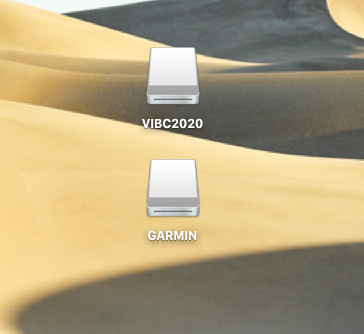
This will give you a drive for the Garmin unit and one for our microSD card.

[![mac-drives.png](https://brmb.support/uploads/images/gallery/2022-07/scaled-1680-/mac-drives.png)](https://brmb.support/uploads/images/gallery/2022-07/mac-drives.png)
### <span style="text-decoration: underline;">Updating Maps</span>

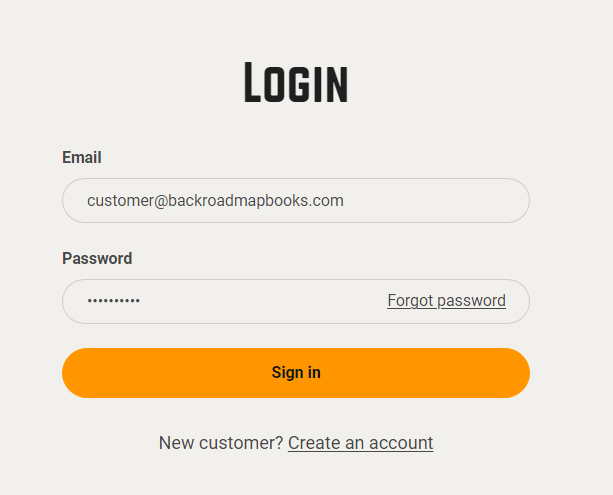
1\. <span class="f_BodyText" style="font-family: 'Zurich BT';">Go to the our website at [Backroadmapbooks](http://www.backroadmapbooks.com/brmb-products/customer/account/login/)</span>

<span class="f_BodyText" style="font-family: 'Zurich BT';">Log into your account on our website, create a new account if you don't have one.</span>

[![2024-11-26 16_20_05-Account – Backroad Maps - Opera.png](https://brmb.support/uploads/images/gallery/2025-03/scaled-1680-/2024-11-26-16-20-05-account-backroad-maps-opera.png)](https://brmb.support/uploads/images/gallery/2025-03/2024-11-26-16-20-05-account-backroad-maps-opera.png)

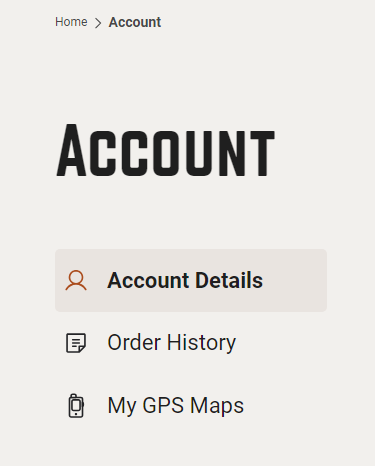
<span class="f_BodyText" style="font-family: 'Zurich BT';">2. Click on the "MY GPS Maps" button to go to the registration page.</span>

[![2024-11-26 16_20_45-Account – Backroad Maps - Opera.png](https://brmb.support/uploads/images/gallery/2025-03/scaled-1680-/2024-11-26-16-20-45-account-backroad-maps-opera.png)](https://brmb.support/uploads/images/gallery/2025-03/2024-11-26-16-20-45-account-backroad-maps-opera.png)

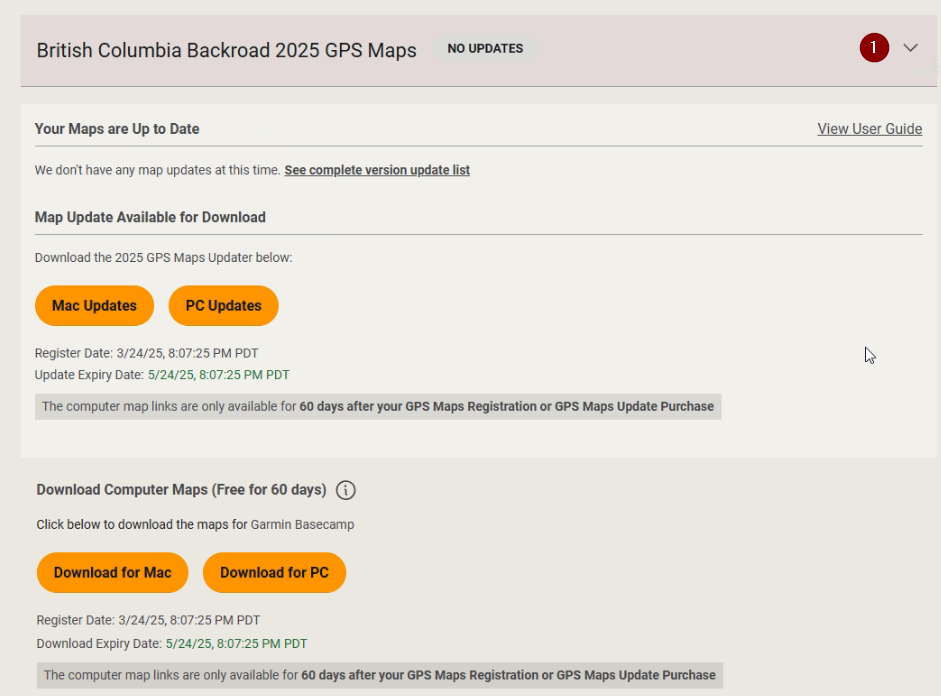
<span data-slate-fragment="JTVCJTdCJTIydHlwZSUyMiUzQSUyMnAlMjIlMkMlMjJjaGlsZHJlbiUyMiUzQSU1QiU3QiUyMnRleHQlMjIlM0ElMjJMb2clMjBpbnRvJTIweW91ciUyMGFjY291bnQlMjAlNDAlMjBodHRwcyUzQSUyRiUyRmJhY2tyb2FkbWFwYm9va3MuY29tJTIyJTdEJTVEJTdEJTVE" style="white-space: pre;">4.) Click the down arrow to expand the product information,</span>

<span data-slate-fragment="JTVCJTdCJTIydHlwZSUyMiUzQSUyMnAlMjIlMkMlMjJjaGlsZHJlbiUyMiUzQSU1QiU3QiUyMnRleHQlMjIlM0ElMjJMb2clMjBpbnRvJTIweW91ciUyMGFjY291bnQlMjAlNDAlMjBodHRwcyUzQSUyRiUyRmJhY2tyb2FkbWFwYm9va3MuY29tJTIyJTdEJTVEJTdEJTVE" style="white-space: pre;">[![download2.png](https://brmb.support/uploads/images/gallery/2025-03/scaled-1680-/download2.png)](https://brmb.support/uploads/images/gallery/2025-03/download2.png)</span>

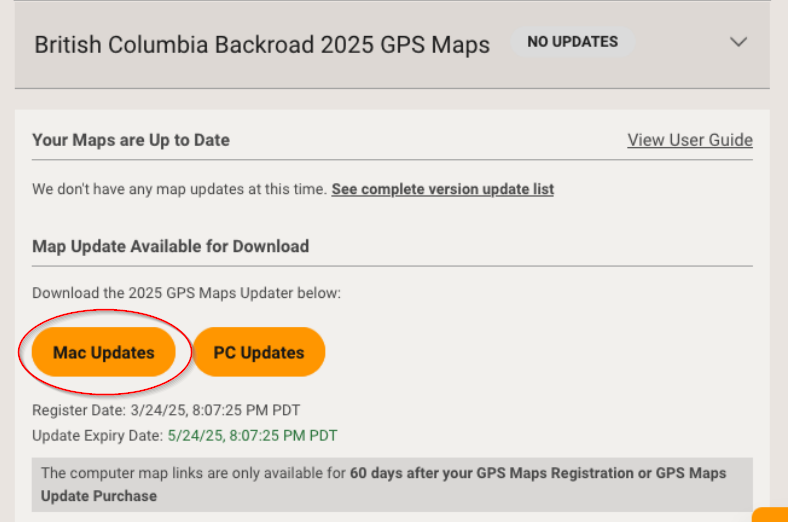
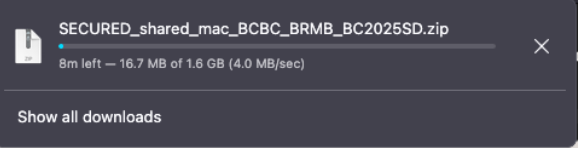
<span data-slate-fragment="JTVCJTdCJTIydHlwZSUyMiUzQSUyMnAlMjIlMkMlMjJjaGlsZHJlbiUyMiUzQSU1QiU3QiUyMnRleHQlMjIlM0ElMjJMb2clMjBpbnRvJTIweW91ciUyMGFjY291bnQlMjAlNDAlMjBodHRwcyUzQSUyRiUyRmJhY2tyb2FkbWFwYm9va3MuY29tJTIyJTdEJTVEJTdEJTVE" style="white-space: pre;">5.)Under **Map Updates Available for Download** Click Mac Updates to download the .zip archive to your computer.</span>

[![Macupdate3.png](https://brmb.support/uploads/images/gallery/2025-03/scaled-1680-/macupdate3.png)](https://brmb.support/uploads/images/gallery/2025-03/macupdate3.png)

<span data-slate-fragment="JTVCJTdCJTIydHlwZSUyMiUzQSUyMnAlMjIlMkMlMjJjaGlsZHJlbiUyMiUzQSU1QiU3QiUyMnRleHQlMjIlM0ElMjJMb2clMjBpbnRvJTIweW91ciUyMGFjY291bnQlMjAlNDAlMjBodHRwcyUzQSUyRiUyRmJhY2tyb2FkbWFwYm9va3MuY29tJTIyJTdEJTVEJTdEJTVE" style="white-space: pre;">[![Macupdate5.png](https://brmb.support/uploads/images/gallery/2025-03/scaled-1680-/macupdate5.png)](https://brmb.support/uploads/images/gallery/2025-03/macupdate5.png)</span>

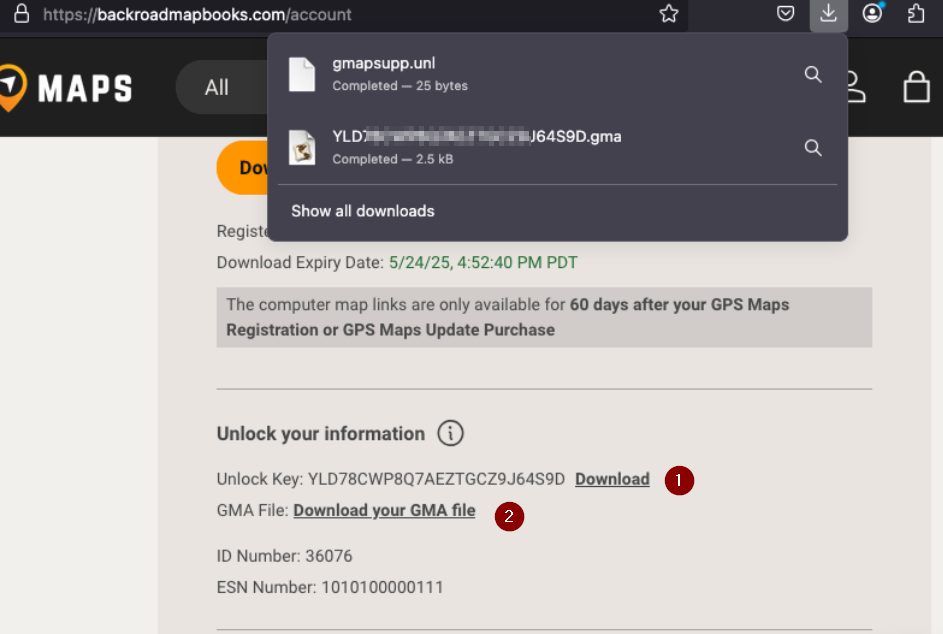
<span data-slate-fragment="JTVCJTdCJTIydHlwZSUyMiUzQSUyMnAlMjIlMkMlMjJjaGlsZHJlbiUyMiUzQSU1QiU3QiUyMnRleHQlMjIlM0ElMjJMb2clMjBpbnRvJTIweW91ciUyMGFjY291bnQlMjAlNDAlMjBodHRwcyUzQSUyRiUyRmJhY2tyb2FkbWFwYm9va3MuY29tJTIyJTdEJTVEJTdEJTVE" style="white-space: pre;">6.) Under **Unlock Information** Click to download your gma and unl files for the updated version.</span>

<span data-slate-fragment="JTVCJTdCJTIydHlwZSUyMiUzQSUyMnAlMjIlMkMlMjJjaGlsZHJlbiUyMiUzQSU1QiU3QiUyMnRleHQlMjIlM0ElMjJMb2clMjBpbnRvJTIweW91ciUyMGFjY291bnQlMjAlNDAlMjBodHRwcyUzQSUyRiUyRmJhY2tyb2FkbWFwYm9va3MuY29tJTIyJTdEJTVEJTdEJTVE" style="white-space: pre;">[![Macupdate4.png](https://brmb.support/uploads/images/gallery/2025-03/scaled-1680-/macupdate4.png)](https://brmb.support/uploads/images/gallery/2025-03/macupdate4.png)</span>

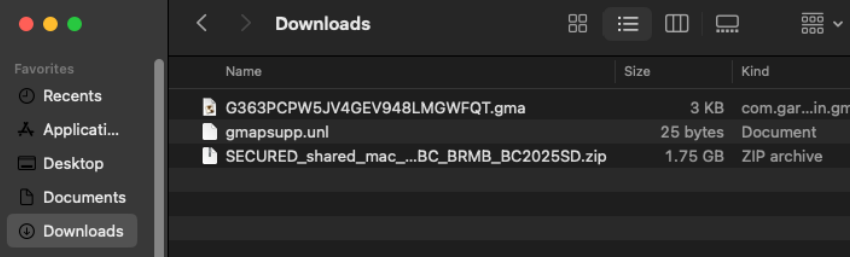
<span data-slate-fragment="JTVCJTdCJTIydHlwZSUyMiUzQSUyMnAlMjIlMkMlMjJjaGlsZHJlbiUyMiUzQSU1QiU3QiUyMnRleHQlMjIlM0ElMjJMb2clMjBpbnRvJTIweW91ciUyMGFjY291bnQlMjAlNDAlMjBodHRwcyUzQSUyRiUyRmJhY2tyb2FkbWFwYm9va3MuY29tJTIyJTdEJTVEJTdEJTVE" style="white-space: pre;">Navigate to the location of the downloaded .zip file.</span>

<span data-slate-fragment="JTVCJTdCJTIydHlwZSUyMiUzQSUyMnAlMjIlMkMlMjJjaGlsZHJlbiUyMiUzQSU1QiU3QiUyMnRleHQlMjIlM0ElMjJMb2clMjBpbnRvJTIweW91ciUyMGFjY291bnQlMjAlNDAlMjBodHRwcyUzQSUyRiUyRmJhY2tyb2FkbWFwYm9va3MuY29tJTIyJTdEJTVEJTdEJTVE" style="white-space: pre;">[![Macupdate6.png](https://brmb.support/uploads/images/gallery/2025-03/scaled-1680-/macupdate6.png)](https://brmb.support/uploads/images/gallery/2025-03/macupdate6.png)</span>

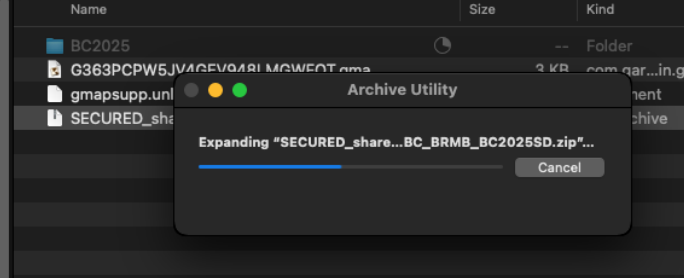
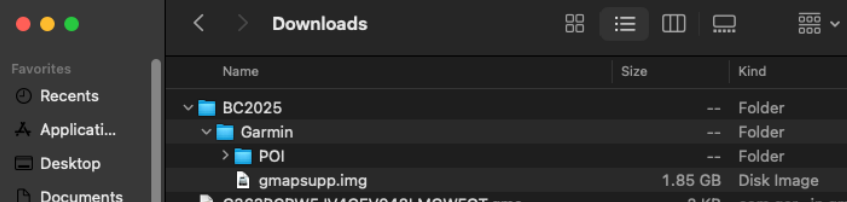
<span data-slate-fragment="JTVCJTdCJTIydHlwZSUyMiUzQSUyMnAlMjIlMkMlMjJjaGlsZHJlbiUyMiUzQSU1QiU3QiUyMnRleHQlMjIlM0ElMjJMb2clMjBpbnRvJTIweW91ciUyMGFjY291bnQlMjAlNDAlMjBodHRwcyUzQSUyRiUyRmJhY2tyb2FkbWFwYm9va3MuY29tJTIyJTdEJTVEJTdEJTVE" style="white-space: pre;">7.) Expand the .zip archive to show the update folder and files.</span>

*<span data-slate-fragment="JTVCJTdCJTIydHlwZSUyMiUzQSUyMnAlMjIlMkMlMjJjaGlsZHJlbiUyMiUzQSU1QiU3QiUyMnRleHQlMjIlM0ElMjJMb2clMjBpbnRvJTIweW91ciUyMGFjY291bnQlMjAlNDAlMjBodHRwcyUzQSUyRiUyRmJhY2tyb2FkbWFwYm9va3MuY29tJTIyJTdEJTVEJTdEJTVE" style="white-space: pre;">**[![Macupdate7.png](https://brmb.support/uploads/images/gallery/2025-03/scaled-1680-/macupdate7.png)](https://brmb.support/uploads/images/gallery/2025-03/macupdate7.png)**</span>*

<span data-slate-fragment="JTVCJTdCJTIydHlwZSUyMiUzQSUyMnAlMjIlMkMlMjJjaGlsZHJlbiUyMiUzQSU1QiU3QiUyMnRleHQlMjIlM0ElMjJMb2clMjBpbnRvJTIweW91ciUyMGFjY291bnQlMjAlNDAlMjBodHRwcyUzQSUyRiUyRmJhY2tyb2FkbWFwYm9va3MuY29tJTIyJTdEJTVEJTdEJTVE" style="white-space: pre;">8.)The zip file will expand to a folder with the name of your Product.</span>

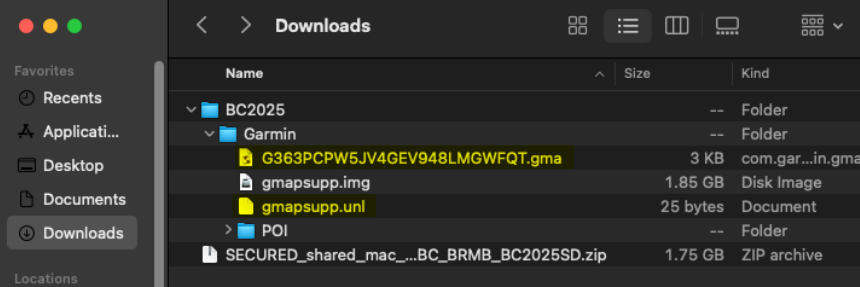
<span data-slate-fragment="JTVCJTdCJTIydHlwZSUyMiUzQSUyMnAlMjIlMkMlMjJjaGlsZHJlbiUyMiUzQSU1QiU3QiUyMnRleHQlMjIlM0ElMjJMb2clMjBpbnRvJTIweW91ciUyMGFjY291bnQlMjAlNDAlMjBodHRwcyUzQSUyRiUyRmJhY2tyb2FkbWFwYm9va3MuY29tJTIyJTdEJTVEJTdEJTVE" style="white-space: pre;">In this example ***BC2025*** and contains the Garmin Folder and files to update your microSD card.</span>

<span data-slate-fragment="JTVCJTdCJTIydHlwZSUyMiUzQSUyMnAlMjIlMkMlMjJjaGlsZHJlbiUyMiUzQSU1QiU3QiUyMnRleHQlMjIlM0ElMjJMb2clMjBpbnRvJTIweW91ciUyMGFjY291bnQlMjAlNDAlMjBodHRwcyUzQSUyRiUyRmJhY2tyb2FkbWFwYm9va3MuY29tJTIyJTdEJTVEJTdEJTVE" style="white-space: pre;">[![Macupdate8.png](https://brmb.support/uploads/images/gallery/2025-03/scaled-1680-/macupdate8.png)](https://brmb.support/uploads/images/gallery/2025-03/macupdate8.png)</span>

<span data-slate-fragment="JTVCJTdCJTIydHlwZSUyMiUzQSUyMnAlMjIlMkMlMjJjaGlsZHJlbiUyMiUzQSU1QiU3QiUyMnRleHQlMjIlM0ElMjJMb2clMjBpbnRvJTIweW91ciUyMGFjY291bnQlMjAlNDAlMjBodHRwcyUzQSUyRiUyRmJhY2tyb2FkbWFwYm9va3MuY29tJTIyJTdEJTVEJTdEJTVE" style="white-space: pre;">9.)Copy the .gma file and the .unl file into the Garmin folder containing the .img file and POI folder</span>

<span data-slate-fragment="JTVCJTdCJTIydHlwZSUyMiUzQSUyMnAlMjIlMkMlMjJjaGlsZHJlbiUyMiUzQSU1QiU3QiUyMnRleHQlMjIlM0ElMjJMb2clMjBpbnRvJTIweW91ciUyMGFjY291bnQlMjAlNDAlMjBodHRwcyUzQSUyRiUyRmJhY2tyb2FkbWFwYm9va3MuY29tJTIyJTdEJTVEJTdEJTVE" style="white-space: pre;">[![Macupdate9.png](https://brmb.support/uploads/images/gallery/2025-03/scaled-1680-/macupdate9.png)](https://brmb.support/uploads/images/gallery/2025-03/macupdate9.png)</span>

### **Backup your existing Card**

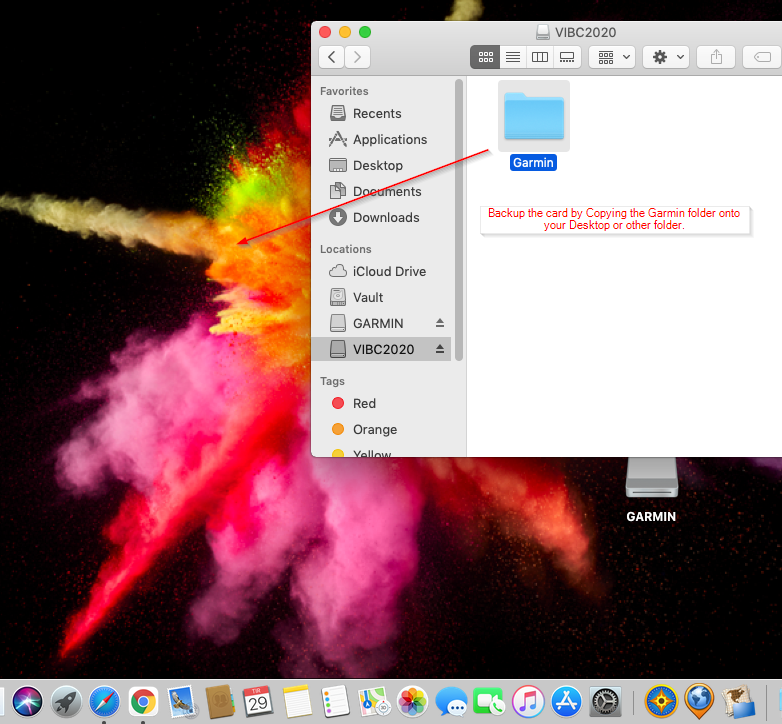
1\. Navigate to your existing microSD card drive.

Copy or drag the **Garmin folder** onto your Desktop or another location for backup purposes.

[![mac-backup-update.png](https://brmb.support/uploads/images/gallery/2022-07/scaled-1680-/mac-backup-update.png)](https://brmb.support/uploads/images/gallery/2022-07/mac-backup-update.png)
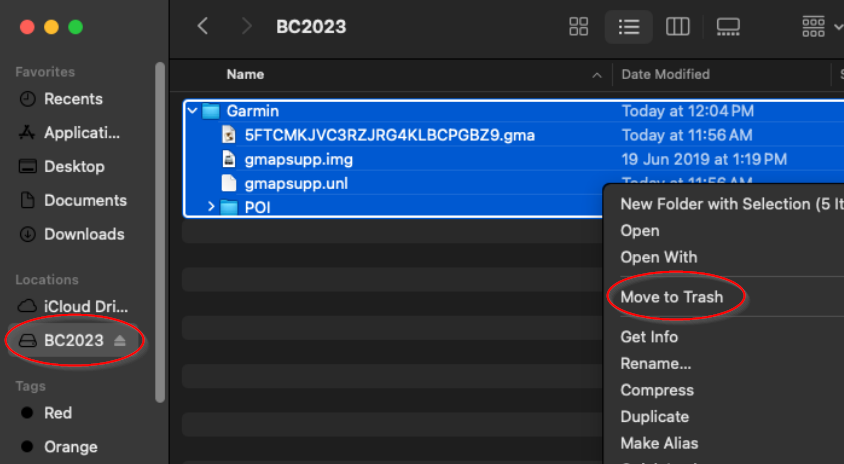
2.Once the backup is complete you can move the Garmin folder on the microSD card to Trash.

[![Macupdate10.png](https://brmb.support/uploads/images/gallery/2025-03/scaled-1680-/macupdate10.png)](https://brmb.support/uploads/images/gallery/2025-03/macupdate10.png)
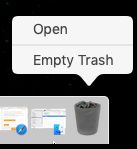
3\. To free the space on the card you will need to empty the trash

[![empty-trash.png](https://brmb.support/uploads/images/gallery/2022-07/scaled-1680-/empty-trash.png)](https://brmb.support/uploads/images/gallery/2022-07/empty-trash.png)
### **Copy the new Garmin folder onto the card**

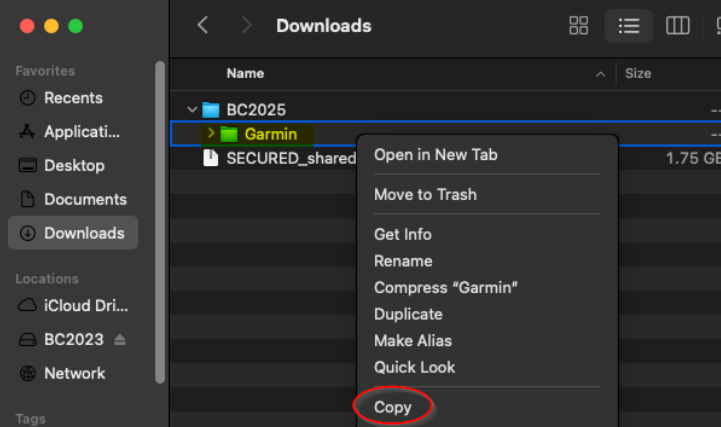
1.Navigate to the location of your new 2025 Garmin folder and copy it.

[![Macupdate12.png](https://brmb.support/uploads/images/gallery/2025-03/scaled-1680-/macupdate12.png)](https://brmb.support/uploads/images/gallery/2025-03/macupdate12.png)
2\. Navigate to your MicroSD card and paste the new Garmin folder

[![Macupdate13.png](https://brmb.support/uploads/images/gallery/2025-03/scaled-1680-/macupdate13.png)](https://brmb.support/uploads/images/gallery/2025-03/macupdate13.png)
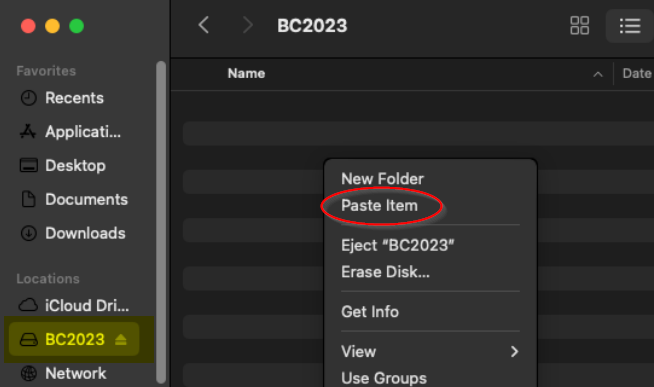
3\. Wait for the files to copied to your microSD card.

[![Macupdate15.png](https://brmb.support/uploads/images/gallery/2025-03/scaled-1680-/macupdate15.png)](https://brmb.support/uploads/images/gallery/2025-03/macupdate15.png)
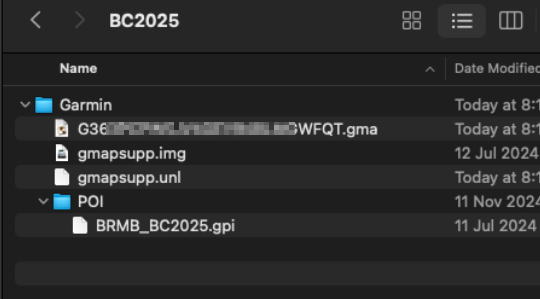
##### *Your microSD card should now be Updated with the latest map data and you can disconnect your GPS and test the maps.*


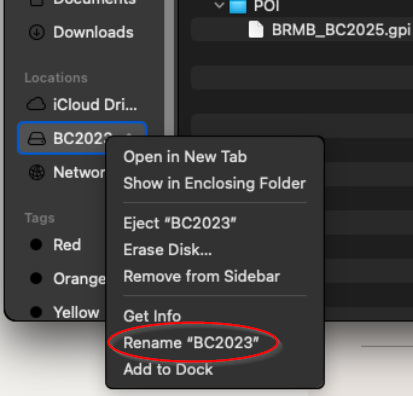
### Rename the card \*Optional

<p class="callout info">Your existing microSD card will still have the old version name so you will need to rename the drive.</p>

 [![Macupdate14.png](https://brmb.support/uploads/images/gallery/2025-03/scaled-1680-/macupdate14.png)](https://brmb.support/uploads/images/gallery/2025-03/macupdate14.png)