# 3.MAC GPS Support

# Registering your GPS Maps [MAC]

# How to register your GPS maps MicroSD

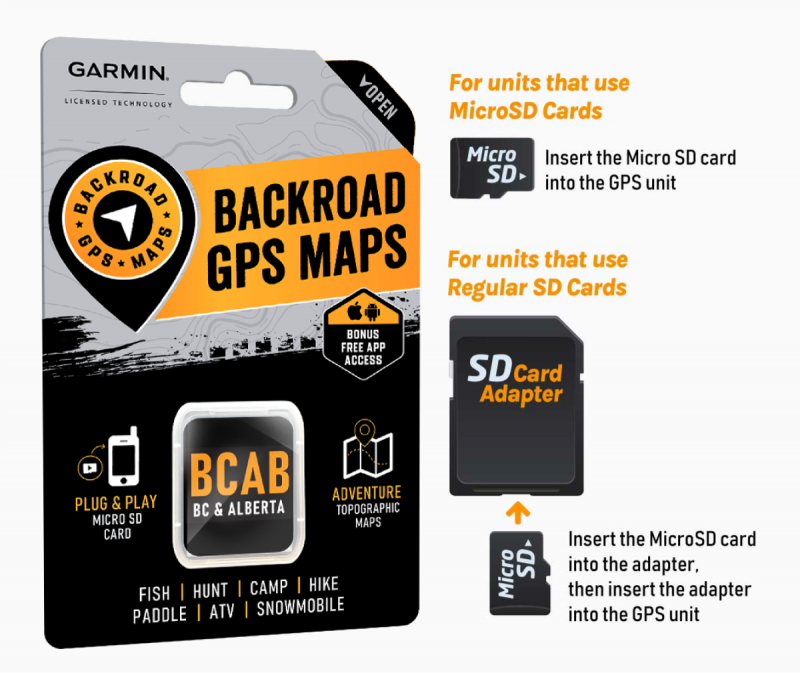
[![gps-maps-plug-play-800x673.png](https://brmb.support/uploads/images/gallery/2023-09/scaled-1680-/gps-maps-plug-play-800x673.png)](https://brmb.support/uploads/images/gallery/2023-09/gps-maps-plug-play-800x673.png)
[![2columns-titles-gps-register.png](https://brmb.support/uploads/images/gallery/2022-07/scaled-1680-/2columns-titles-gps-register.png)](https://brmb.support/uploads/images/gallery/2022-07/2columns-titles-gps-register.png)
*Technical guide – Backroad Map Books*

<div class="
          max-w-full
          
          prose
          prose-neutral
          prose-headings:font-semibold
          prose:text-neutral-800
          prose-strong:font-semibold
          prose-ul:marker:text-neutral-700
          prose-li:marker:text-neutral-700
          prose-headings:text-neutral-800
          prose-pre:bg-transparent
          prose-pre:rounded-xl
          prose-pre:text-neutral-800
          prose-pre:font-normal
          prose-pre:my-0
          prose-pre:max-w-full
          prose-pre:pt-1
           [&_code:not(pre_code)]:text-neutral-700
          [&_code:not(pre_code)]:bg-neutral-100
          [&_code:not(pre_code)]:font-normal
          [&_code:not(pre_code)]:px-1.5
          [&_code:not(pre_code)]:py-0.5
          [&_code:not(pre_code)]:rounded-md
          [&_code:not(pre_code)]:text-[90%]
          [&_code:not(pre_code)]:before:hidden
          [&_code:not(pre_code)]:after:hidden
          dark:prose-invert
          dark:prose:text-neutral-200
          dark:prose-pre:bg-none
          dark:prose-headings:text-neutral-200
          dark:prose-strong:text-neutral-200
          dark:prose-pre:text-neutral-200
          dark:prose:pre:text-neutral-200
          dark:[&_code:not(pre_code)]:text-neutral-200
          dark:[&_code:not(pre_code)]:bg-neutral-800
          dark:[&_code:not(pre_code)]:font-normal
          dark:prose-ul:marker:text-neutral-300
          dark:prose-li:marker:text-neutral-300
          break-words
        " id="bkmrk--2">---

</div>## 1. Why Register Your MicroSD?

<div class="
          max-w-full
          
          prose
          prose-neutral
          prose-headings:font-semibold
          prose:text-neutral-800
          prose-strong:font-semibold
          prose-ul:marker:text-neutral-700
          prose-li:marker:text-neutral-700
          prose-headings:text-neutral-800
          prose-pre:bg-transparent
          prose-pre:rounded-xl
          prose-pre:text-neutral-800
          prose-pre:font-normal
          prose-pre:my-0
          prose-pre:max-w-full
          prose-pre:pt-1
           [&_code:not(pre_code)]:text-neutral-700
          [&_code:not(pre_code)]:bg-neutral-100
          [&_code:not(pre_code)]:font-normal
          [&_code:not(pre_code)]:px-1.5
          [&_code:not(pre_code)]:py-0.5
          [&_code:not(pre_code)]:rounded-md
          [&_code:not(pre_code)]:text-[90%]
          [&_code:not(pre_code)]:before:hidden
          [&_code:not(pre_code)]:after:hidden
          dark:prose-invert
          dark:prose:text-neutral-200
          dark:prose-pre:bg-none
          dark:prose-headings:text-neutral-200
          dark:prose-strong:text-neutral-200
          dark:prose-pre:text-neutral-200
          dark:prose:pre:text-neutral-200
          dark:[&_code:not(pre_code)]:text-neutral-200
          dark:[&_code:not(pre_code)]:bg-neutral-800
          dark:[&_code:not(pre_code)]:font-normal
          dark:prose-ul:marker:text-neutral-300
          dark:prose-li:marker:text-neutral-300
          break-words
        " id="bkmrk-feature-description-"><table><thead><tr><th>Feature</th><th>Description</th></tr></thead><tbody><tr><td>**Computer‑based map downloads**</td><td>Access to the latest *Computer Maps* for macOS &amp; Windows.</td></tr><tr><td>**Secure license storage**</td><td>Keeps your **`gmapsupp.unl`** and **`gmapsupp.gma`** files safe in your account.</td></tr><tr><td>**Discounted updates**</td><td>Receive future map releases at a reduced price.</td></tr><tr><td>**Priority technical support**</td><td>Faster response for any Garmin‑map‑related issue.</td></tr></tbody></table>

</div>> **Free Updates** – After registration you can download map updates for **60 days** at no charge.  
> If you bought an older version from a retailer, you may upgrade to the latest map release within that 60‑day window.

> **Important:**  
> • A card that has already been registered **cannot** be registered again.  
> • If your card is “used” or already updated, the registration will fail.

<div class="
          max-w-full
          
          prose
          prose-neutral
          prose-headings:font-semibold
          prose:text-neutral-800
          prose-strong:font-semibold
          prose-ul:marker:text-neutral-700
          prose-li:marker:text-neutral-700
          prose-headings:text-neutral-800
          prose-pre:bg-transparent
          prose-pre:rounded-xl
          prose-pre:text-neutral-800
          prose-pre:font-normal
          prose-pre:my-0
          prose-pre:max-w-full
          prose-pre:pt-1
           [&_code:not(pre_code)]:text-neutral-700
          [&_code:not(pre_code)]:bg-neutral-100
          [&_code:not(pre_code)]:font-normal
          [&_code:not(pre_code)]:px-1.5
          [&_code:not(pre_code)]:py-0.5
          [&_code:not(pre_code)]:rounded-md
          [&_code:not(pre_code)]:text-[90%]
          [&_code:not(pre_code)]:before:hidden
          [&_code:not(pre_code)]:after:hidden
          dark:prose-invert
          dark:prose:text-neutral-200
          dark:prose-pre:bg-none
          dark:prose-headings:text-neutral-200
          dark:prose-strong:text-neutral-200
          dark:prose-pre:text-neutral-200
          dark:prose:pre:text-neutral-200
          dark:[&_code:not(pre_code)]:text-neutral-200
          dark:[&_code:not(pre_code)]:bg-neutral-800
          dark:[&_code:not(pre_code)]:font-normal
          dark:prose-ul:marker:text-neutral-300
          dark:prose-li:marker:text-neutral-300
          break-words
        " id="bkmrk--3">---

</div>## 2. Prerequisites

<div class="
          max-w-full
          
          prose
          prose-neutral
          prose-headings:font-semibold
          prose:text-neutral-800
          prose-strong:font-semibold
          prose-ul:marker:text-neutral-700
          prose-li:marker:text-neutral-700
          prose-headings:text-neutral-800
          prose-pre:bg-transparent
          prose-pre:rounded-xl
          prose-pre:text-neutral-800
          prose-pre:font-normal
          prose-pre:my-0
          prose-pre:max-w-full
          prose-pre:pt-1
           [&_code:not(pre_code)]:text-neutral-700
          [&_code:not(pre_code)]:bg-neutral-100
          [&_code:not(pre_code)]:font-normal
          [&_code:not(pre_code)]:px-1.5
          [&_code:not(pre_code)]:py-0.5
          [&_code:not(pre_code)]:rounded-md
          [&_code:not(pre_code)]:text-[90%]
          [&_code:not(pre_code)]:before:hidden
          [&_code:not(pre_code)]:after:hidden
          dark:prose-invert
          dark:prose:text-neutral-200
          dark:prose-pre:bg-none
          dark:prose-headings:text-neutral-200
          dark:prose-strong:text-neutral-200
          dark:prose-pre:text-neutral-200
          dark:prose:pre:text-neutral-200
          dark:[&_code:not(pre_code)]:text-neutral-200
          dark:[&_code:not(pre_code)]:bg-neutral-800
          dark:[&_code:not(pre_code)]:font-normal
          dark:prose-ul:marker:text-neutral-300
          dark:prose-li:marker:text-neutral-300
          break-words
        " id="bkmrk-step-action-notes-1-"><table><thead><tr><th>Step</th><th>Action</th><th>Notes</th></tr></thead><tbody><tr><td>1</td><td>**Insert the MicroSD card**</td><td>• If your computer has an SD‑card slot, insert the card directly.   
• If not, plug the card into your Garmin GPS and connect the GPS to your computer via USB.</td></tr><tr><td>2</td><td>**Log in to Backroad Map Books**</td><td>URL: [https://backroadmapbooks.com/account/login](https://backroadmapbooks.com/account/login)   
Create an account if you do not already have one.</td></tr><tr><td>3</td><td>**Locate the license files**</td><td>The required files (`gmapsupp.unl` and `gmapsupp.gma`) are in the **Garmin** folder on your MicroSD.</td></tr></tbody></table>

---

</div>## 3. Registration Workflow

> All steps are performed on the *My GPS Maps* registration page.

### 3.1 Navigate to the Registration Page

<div class="
          max-w-full
          
          prose
          prose-neutral
          prose-headings:font-semibold
          prose:text-neutral-800
          prose-strong:font-semibold
          prose-ul:marker:text-neutral-700
          prose-li:marker:text-neutral-700
          prose-headings:text-neutral-800
          prose-pre:bg-transparent
          prose-pre:rounded-xl
          prose-pre:text-neutral-800
          prose-pre:font-normal
          prose-pre:my-0
          prose-pre:max-w-full
          prose-pre:pt-1
           [&_code:not(pre_code)]:text-neutral-700
          [&_code:not(pre_code)]:bg-neutral-100
          [&_code:not(pre_code)]:font-normal
          [&_code:not(pre_code)]:px-1.5
          [&_code:not(pre_code)]:py-0.5
          [&_code:not(pre_code)]:rounded-md
          [&_code:not(pre_code)]:text-[90%]
          [&_code:not(pre_code)]:before:hidden
          [&_code:not(pre_code)]:after:hidden
          dark:prose-invert
          dark:prose:text-neutral-200
          dark:prose-pre:bg-none
          dark:prose-headings:text-neutral-200
          dark:prose-strong:text-neutral-200
          dark:prose-pre:text-neutral-200
          dark:prose:pre:text-neutral-200
          dark:[&_code:not(pre_code)]:text-neutral-200
          dark:[&_code:not(pre_code)]:bg-neutral-800
          dark:[&_code:not(pre_code)]:font-normal
          dark:prose-ul:marker:text-neutral-300
          dark:prose-li:marker:text-neutral-300
          break-words
        " id="bkmrk-after-login%2C-click-t">1. After login, click the **“MY GPS MAPS”** button (top‑right).
2. On the resulting page, select **“Register SD”**.
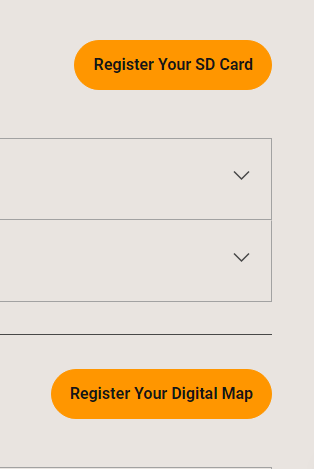
    
    ![Registration Button](https://brmb.support/uploads/images/gallery/2025-03/reg.png)

</div>### 3.2 Upload the Unlock Code &amp; GMA File

<div class="
          max-w-full
          
          prose
          prose-neutral
          prose-headings:font-semibold
          prose:text-neutral-800
          prose-strong:font-semibold
          prose-ul:marker:text-neutral-700
          prose-li:marker:text-neutral-700
          prose-headings:text-neutral-800
          prose-pre:bg-transparent
          prose-pre:rounded-xl
          prose-pre:text-neutral-800
          prose-pre:font-normal
          prose-pre:my-0
          prose-pre:max-w-full
          prose-pre:pt-1
           [&_code:not(pre_code)]:text-neutral-700
          [&_code:not(pre_code)]:bg-neutral-100
          [&_code:not(pre_code)]:font-normal
          [&_code:not(pre_code)]:px-1.5
          [&_code:not(pre_code)]:py-0.5
          [&_code:not(pre_code)]:rounded-md
          [&_code:not(pre_code)]:text-[90%]
          [&_code:not(pre_code)]:before:hidden
          [&_code:not(pre_code)]:after:hidden
          dark:prose-invert
          dark:prose:text-neutral-200
          dark:prose-pre:bg-none
          dark:prose-headings:text-neutral-200
          dark:prose-strong:text-neutral-200
          dark:prose-pre:text-neutral-200
          dark:prose:pre:text-neutral-200
          dark:[&_code:not(pre_code)]:text-neutral-200
          dark:[&_code:not(pre_code)]:bg-neutral-800
          dark:[&_code:not(pre_code)]:font-normal
          dark:prose-ul:marker:text-neutral-300
          dark:prose-li:marker:text-neutral-300
          break-words
        " id="bkmrk-field-file-how-to-se"><table><thead><tr><th>Field</th><th>File</th><th>How to select</th></tr></thead><tbody><tr><td>**Unlock Code (`gmapsupp.unl`)**</td><td>`gmapsupp.unl`</td><td>Use the **Choose File** button to pick this file from the *Garmin* folder.</td></tr><tr><td>**Gma File (`gmapsupp.gma`)**</td><td>`gmapsupp.gma`</td><td>Use the **Choose File** button for the second field.</td></tr></tbody></table>

</div>> **Tip:**  
> Double‑check that the files you pick are **exactly** the `.unl` and `.gma` files from the Garmin folder. Any mismatch will trigger an error.

#### 3.3 Submit

<div class="
          max-w-full
          
          prose
          prose-neutral
          prose-headings:font-semibold
          prose:text-neutral-800
          prose-strong:font-semibold
          prose-ul:marker:text-neutral-700
          prose-li:marker:text-neutral-700
          prose-headings:text-neutral-800
          prose-pre:bg-transparent
          prose-pre:rounded-xl
          prose-pre:text-neutral-800
          prose-pre:font-normal
          prose-pre:my-0
          prose-pre:max-w-full
          prose-pre:pt-1
           [&_code:not(pre_code)]:text-neutral-700
          [&_code:not(pre_code)]:bg-neutral-100
          [&_code:not(pre_code)]:font-normal
          [&_code:not(pre_code)]:px-1.5
          [&_code:not(pre_code)]:py-0.5
          [&_code:not(pre_code)]:rounded-md
          [&_code:not(pre_code)]:text-[90%]
          [&_code:not(pre_code)]:before:hidden
          [&_code:not(pre_code)]:after:hidden
          dark:prose-invert
          dark:prose:text-neutral-200
          dark:prose-pre:bg-none
          dark:prose-headings:text-neutral-200
          dark:prose-strong:text-neutral-200
          dark:prose-pre:text-neutral-200
          dark:prose:pre:text-neutral-200
          dark:[&_code:not(pre_code)]:text-neutral-200
          dark:[&_code:not(pre_code)]:bg-neutral-800
          dark:[&_code:not(pre_code)]:font-normal
          dark:prose-ul:marker:text-neutral-300
          dark:prose-li:marker:text-neutral-300
          break-words
        " id="bkmrk-once-both-files-appe">1. Once both files appear in the form, click **SUBMIT**.
2. A green confirmation box will appear, and your product will be listed under “My Products”.

    
    ![Success Message](https://brmb.support/uploads/images/gallery/2025-03/regsuccess.png)

</div>> **Result:** The MicroSD card is now registered to your Backroad Map Books account.

<div class="
          max-w-full
          
          prose
          prose-neutral
          prose-headings:font-semibold
          prose:text-neutral-800
          prose-strong:font-semibold
          prose-ul:marker:text-neutral-700
          prose-li:marker:text-neutral-700
          prose-headings:text-neutral-800
          prose-pre:bg-transparent
          prose-pre:rounded-xl
          prose-pre:text-neutral-800
          prose-pre:font-normal
          prose-pre:my-0
          prose-pre:max-w-full
          prose-pre:pt-1
           [&_code:not(pre_code)]:text-neutral-700
          [&_code:not(pre_code)]:bg-neutral-100
          [&_code:not(pre_code)]:font-normal
          [&_code:not(pre_code)]:px-1.5
          [&_code:not(pre_code)]:py-0.5
          [&_code:not(pre_code)]:rounded-md
          [&_code:not(pre_code)]:text-[90%]
          [&_code:not(pre_code)]:before:hidden
          [&_code:not(pre_code)]:after:hidden
          dark:prose-invert
          dark:prose:text-neutral-200
          dark:prose-pre:bg-none
          dark:prose-headings:text-neutral-200
          dark:prose-strong:text-neutral-200
          dark:prose-pre:text-neutral-200
          dark:prose:pre:text-neutral-200
          dark:[&_code:not(pre_code)]:text-neutral-200
          dark:[&_code:not(pre_code)]:bg-neutral-800
          dark:[&_code:not(pre_code)]:font-normal
          dark:prose-ul:marker:text-neutral-300
          dark:prose-li:marker:text-neutral-300
          break-words
        " id="bkmrk--4">---

</div>## 4. Post‑Registration

<div class="
          max-w-full
          
          prose
          prose-neutral
          prose-headings:font-semibold
          prose:text-neutral-800
          prose-strong:font-semibold
          prose-ul:marker:text-neutral-700
          prose-li:marker:text-neutral-700
          prose-headings:text-neutral-800
          prose-pre:bg-transparent
          prose-pre:rounded-xl
          prose-pre:text-neutral-800
          prose-pre:font-normal
          prose-pre:my-0
          prose-pre:max-w-full
          prose-pre:pt-1
           [&_code:not(pre_code)]:text-neutral-700
          [&_code:not(pre_code)]:bg-neutral-100
          [&_code:not(pre_code)]:font-normal
          [&_code:not(pre_code)]:px-1.5
          [&_code:not(pre_code)]:py-0.5
          [&_code:not(pre_code)]:rounded-md
          [&_code:not(pre_code)]:text-[90%]
          [&_code:not(pre_code)]:before:hidden
          [&_code:not(pre_code)]:after:hidden
          dark:prose-invert
          dark:prose:text-neutral-200
          dark:prose-pre:bg-none
          dark:prose-headings:text-neutral-200
          dark:prose-strong:text-neutral-200
          dark:prose-pre:text-neutral-200
          dark:prose:pre:text-neutral-200
          dark:[&_code:not(pre_code)]:text-neutral-200
          dark:[&_code:not(pre_code)]:bg-neutral-800
          dark:[&_code:not(pre_code)]:font-normal
          dark:prose-ul:marker:text-neutral-300
          dark:prose-li:marker:text-neutral-300
          break-words
        " id="bkmrk-access-the-%E2%80%9Ccomputer">- **Access the “Computer Maps”** – Log in, go to **“My Products”** and download the latest PC‑compatible maps.
- **Update within 60 days** – Download updates for free.
- **Backup your files** – Although the unlock codes are stored in the cloud, keep local copies of the `.unl` and `.gma` files on your computer for future reference.

</div>[![product.png](https://brmb.support/uploads/images/gallery/2025-03/scaled-1680-/product.png)](https://brmb.support/uploads/images/gallery/2025-03/product.png)

<div class="
          max-w-full
          
          prose
          prose-neutral
          prose-headings:font-semibold
          prose:text-neutral-800
          prose-strong:font-semibold
          prose-ul:marker:text-neutral-700
          prose-li:marker:text-neutral-700
          prose-headings:text-neutral-800
          prose-pre:bg-transparent
          prose-pre:rounded-xl
          prose-pre:text-neutral-800
          prose-pre:font-normal
          prose-pre:my-0
          prose-pre:max-w-full
          prose-pre:pt-1
           [&_code:not(pre_code)]:text-neutral-700
          [&_code:not(pre_code)]:bg-neutral-100
          [&_code:not(pre_code)]:font-normal
          [&_code:not(pre_code)]:px-1.5
          [&_code:not(pre_code)]:py-0.5
          [&_code:not(pre_code)]:rounded-md
          [&_code:not(pre_code)]:text-[90%]
          [&_code:not(pre_code)]:before:hidden
          [&_code:not(pre_code)]:after:hidden
          dark:prose-invert
          dark:prose:text-neutral-200
          dark:prose-pre:bg-none
          dark:prose-headings:text-neutral-200
          dark:prose-strong:text-neutral-200
          dark:prose-pre:text-neutral-200
          dark:prose:pre:text-neutral-200
          dark:[&_code:not(pre_code)]:text-neutral-200
          dark:[&_code:not(pre_code)]:bg-neutral-800
          dark:[&_code:not(pre_code)]:font-normal
          dark:prose-ul:marker:text-neutral-300
          dark:prose-li:marker:text-neutral-300
          break-words
        " id="bkmrk--6">---

</div>## 4. Common Error Messages &amp; Fixes

<div class="
          max-w-full
          
          prose
          prose-neutral
          prose-headings:font-semibold
          prose:text-neutral-800
          prose-strong:font-semibold
          prose-ul:marker:text-neutral-700
          prose-li:marker:text-neutral-700
          prose-headings:text-neutral-800
          prose-pre:bg-transparent
          prose-pre:rounded-xl
          prose-pre:text-neutral-800
          prose-pre:font-normal
          prose-pre:my-0
          prose-pre:max-w-full
          prose-pre:pt-1
           [&_code:not(pre_code)]:text-neutral-700
          [&_code:not(pre_code)]:bg-neutral-100
          [&_code:not(pre_code)]:font-normal
          [&_code:not(pre_code)]:px-1.5
          [&_code:not(pre_code)]:py-0.5
          [&_code:not(pre_code)]:rounded-md
          [&_code:not(pre_code)]:text-[90%]
          [&_code:not(pre_code)]:before:hidden
          [&_code:not(pre_code)]:after:hidden
          dark:prose-invert
          dark:prose:text-neutral-200
          dark:prose-pre:bg-none
          dark:prose-headings:text-neutral-200
          dark:prose-strong:text-neutral-200
          dark:prose-pre:text-neutral-200
          dark:prose:pre:text-neutral-200
          dark:[&_code:not(pre_code)]:text-neutral-200
          dark:[&_code:not(pre_code)]:bg-neutral-800
          dark:[&_code:not(pre_code)]:font-normal
          dark:prose-ul:marker:text-neutral-300
          dark:prose-li:marker:text-neutral-300
          break-words
        " id="bkmrk-error-cause-remedy-%E2%80%9C"><table><thead><tr><th>Error</th><th>Cause</th><th>Remedy</th></tr></thead><tbody><tr><td>**“No ESN data found with unlockCode”**</td><td>ESN (Electronic Serial Number) missing or corrupted.</td><td>Contact Backroad Map Books support (email: gps&lt;at&gt;backroadmapbooks.com).</td></tr><tr><td>**“Invalid File Uploaded”**</td><td>Wrong file type chosen (e.g., a `.zip` instead of `.gma` or `.unl`).</td><td>Re‑select the exact `.gma` and `.unl` files from the Garmin folder.</td></tr><tr><td>**“This card has already been registered”**</td><td>Card was previously registered on another account or already updated.</td><td>Not recoverable – you must purchase a new card or contact support for advice.</td></tr></tbody></table>

---

</div><div class="
          max-w-full
          
          prose
          prose-neutral
          prose-headings:font-semibold
          prose:text-neutral-800
          prose-strong:font-semibold
          prose-ul:marker:text-neutral-700
          prose-li:marker:text-neutral-700
          prose-headings:text-neutral-800
          prose-pre:bg-transparent
          prose-pre:rounded-xl
          prose-pre:text-neutral-800
          prose-pre:font-normal
          prose-pre:my-0
          prose-pre:max-w-full
          prose-pre:pt-1
           [&_code:not(pre_code)]:text-neutral-700
          [&_code:not(pre_code)]:bg-neutral-100
          [&_code:not(pre_code)]:font-normal
          [&_code:not(pre_code)]:px-1.5
          [&_code:not(pre_code)]:py-0.5
          [&_code:not(pre_code)]:rounded-md
          [&_code:not(pre_code)]:text-[90%]
          [&_code:not(pre_code)]:before:hidden
          [&_code:not(pre_code)]:after:hidden
          dark:prose-invert
          dark:prose:text-neutral-200
          dark:prose-pre:bg-none
          dark:prose-headings:text-neutral-200
          dark:prose-strong:text-neutral-200
          dark:prose-pre:text-neutral-200
          dark:prose:pre:text-neutral-200
          dark:[&_code:not(pre_code)]:text-neutral-200
          dark:[&_code:not(pre_code)]:bg-neutral-800
          dark:[&_code:not(pre_code)]:font-normal
          dark:prose-ul:marker:text-neutral-300
          dark:prose-li:marker:text-neutral-300
          break-words
        " id="bkmrk-file-size-%26-permissi">---

</div>## 5. Quick Reference

<div class="
          max-w-full
          
          prose
          prose-neutral
          prose-headings:font-semibold
          prose:text-neutral-800
          prose-strong:font-semibold
          prose-ul:marker:text-neutral-700
          prose-li:marker:text-neutral-700
          prose-headings:text-neutral-800
          prose-pre:bg-transparent
          prose-pre:rounded-xl
          prose-pre:text-neutral-800
          prose-pre:font-normal
          prose-pre:my-0
          prose-pre:max-w-full
          prose-pre:pt-1
           [&_code:not(pre_code)]:text-neutral-700
          [&_code:not(pre_code)]:bg-neutral-100
          [&_code:not(pre_code)]:font-normal
          [&_code:not(pre_code)]:px-1.5
          [&_code:not(pre_code)]:py-0.5
          [&_code:not(pre_code)]:rounded-md
          [&_code:not(pre_code)]:text-[90%]
          [&_code:not(pre_code)]:before:hidden
          [&_code:not(pre_code)]:after:hidden
          dark:prose-invert
          dark:prose:text-neutral-200
          dark:prose-pre:bg-none
          dark:prose-headings:text-neutral-200
          dark:prose-strong:text-neutral-200
          dark:prose-pre:text-neutral-200
          dark:prose:pre:text-neutral-200
          dark:[&_code:not(pre_code)]:text-neutral-200
          dark:[&_code:not(pre_code)]:bg-neutral-800
          dark:[&_code:not(pre_code)]:font-normal
          dark:prose-ul:marker:text-neutral-300
          dark:prose-li:marker:text-neutral-300
          break-words
        " id="bkmrk-action-shortcut-log-"><table><thead><tr><th>Action</th><th>Shortcut</th></tr></thead><tbody><tr><td>Log in</td><td>`Ctrl+L` (Chrome)</td></tr><tr><td>Open registration</td><td>**MY GPS MAPS** → **Register SD**</td></tr><tr><td>File picker</td><td>`gmapsupp.unl` → **Choose File**; `gmapsupp.gma` → **Choose File**</td></tr><tr><td>Submit</td><td>**SUBMIT** button</td></tr></tbody></table>

</div><div class="
          max-w-full
          
          prose
          prose-neutral
          prose-headings:font-semibold
          prose:text-neutral-800
          prose-strong:font-semibold
          prose-ul:marker:text-neutral-700
          prose-li:marker:text-neutral-700
          prose-headings:text-neutral-800
          prose-pre:bg-transparent
          prose-pre:rounded-xl
          prose-pre:text-neutral-800
          prose-pre:font-normal
          prose-pre:my-0
          prose-pre:max-w-full
          prose-pre:pt-1
           [&_code:not(pre_code)]:text-neutral-700
          [&_code:not(pre_code)]:bg-neutral-100
          [&_code:not(pre_code)]:font-normal
          [&_code:not(pre_code)]:px-1.5
          [&_code:not(pre_code)]:py-0.5
          [&_code:not(pre_code)]:rounded-md
          [&_code:not(pre_code)]:text-[90%]
          [&_code:not(pre_code)]:before:hidden
          [&_code:not(pre_code)]:after:hidden
          dark:prose-invert
          dark:prose:text-neutral-200
          dark:prose-pre:bg-none
          dark:prose-headings:text-neutral-200
          dark:prose-strong:text-neutral-200
          dark:prose-pre:text-neutral-200
          dark:prose:pre:text-neutral-200
          dark:[&_code:not(pre_code)]:text-neutral-200
          dark:[&_code:not(pre_code)]:bg-neutral-800
          dark:[&_code:not(pre_code)]:font-normal
          dark:prose-ul:marker:text-neutral-300
          dark:prose-li:marker:text-neutral-300
          break-words
        " id="bkmrk--7">---

</div><div class="
          max-w-full
          
          prose
          prose-neutral
          prose-headings:font-semibold
          prose:text-neutral-800
          prose-strong:font-semibold
          prose-ul:marker:text-neutral-700
          prose-li:marker:text-neutral-700
          prose-headings:text-neutral-800
          prose-pre:bg-transparent
          prose-pre:rounded-xl
          prose-pre:text-neutral-800
          prose-pre:font-normal
          prose-pre:my-0
          prose-pre:max-w-full
          prose-pre:pt-1
           [&_code:not(pre_code)]:text-neutral-700
          [&_code:not(pre_code)]:bg-neutral-100
          [&_code:not(pre_code)]:font-normal
          [&_code:not(pre_code)]:px-1.5
          [&_code:not(pre_code)]:py-0.5
          [&_code:not(pre_code)]:rounded-md
          [&_code:not(pre_code)]:text-[90%]
          [&_code:not(pre_code)]:before:hidden
          [&_code:not(pre_code)]:after:hidden
          dark:prose-invert
          dark:prose:text-neutral-200
          dark:prose-pre:bg-none
          dark:prose-headings:text-neutral-200
          dark:prose-strong:text-neutral-200
          dark:prose-pre:text-neutral-200
          dark:prose:pre:text-neutral-200
          dark:[&_code:not(pre_code)]:text-neutral-200
          dark:[&_code:not(pre_code)]:bg-neutral-800
          dark:[&_code:not(pre_code)]:font-normal
          dark:prose-ul:marker:text-neutral-300
          dark:prose-li:marker:text-neutral-300
          break-words
        " id="bkmrk--8">---

</div>*Prepared by the Backroad Map Books Technical Support Team*

# Registering your GPS Maps Digital

[![2columns-titles-gps-register.png](https://brmb.support/uploads/images/gallery/2022-07/scaled-1680-/2columns-titles-gps-register.png)](https://brmb.support/uploads/images/gallery/2022-07/2columns-titles-gps-register.png)

## 1. Overview

This guide explains how to register your digital map access code so you can:

<div class="
          max-w-full
          
          prose
          prose-neutral
          prose-headings:font-semibold
          prose:text-neutral-800
          prose-strong:font-semibold
          prose-ul:marker:text-neutral-700
          prose-li:marker:text-neutral-700
          prose-headings:text-neutral-800
          prose-pre:bg-transparent
          prose-pre:rounded-xl
          prose-pre:text-neutral-800
          prose-pre:font-normal
          prose-pre:my-0
          prose-pre:max-w-full
          prose-pre:pt-1
           [&_code:not(pre_code)]:text-neutral-700
          [&_code:not(pre_code)]:bg-neutral-100
          [&_code:not(pre_code)]:font-normal
          [&_code:not(pre_code)]:px-1.5
          [&_code:not(pre_code)]:py-0.5
          [&_code:not(pre_code)]:rounded-md
          [&_code:not(pre_code)]:text-[90%]
          [&_code:not(pre_code)]:before:hidden
          [&_code:not(pre_code)]:after:hidden
          dark:prose-invert
          dark:prose:text-neutral-200
          dark:prose-pre:bg-none
          dark:prose-headings:text-neutral-200
          dark:prose-strong:text-neutral-200
          dark:prose-pre:text-neutral-200
          dark:prose:pre:text-neutral-200
          dark:[&_code:not(pre_code)]:text-neutral-200
          dark:[&_code:not(pre_code)]:bg-neutral-800
          dark:[&_code:not(pre_code)]:font-normal
          dark:prose-ul:marker:text-neutral-300
          dark:prose-li:marker:text-neutral-300
          break-words
        " id="bkmrk-download-computer%E2%80%91co">- Download computer‑compatible maps for macOS or Windows.
- Store a secure copy of your Garmin license/unlock files.
- Receive future updates at a discounted price.
- Access priority technical support.

</div>> **NOTE:** After registration, you receive **free map updates for 60 days**.  
> Older versions purchased from a retailer can be upgraded to the latest maps within that 60‑day window.

<div class="
          max-w-full
          
          prose
          prose-neutral
          prose-headings:font-semibold
          prose:text-neutral-800
          prose-strong:font-semibold
          prose-ul:marker:text-neutral-700
          prose-li:marker:text-neutral-700
          prose-headings:text-neutral-800
          prose-pre:bg-transparent
          prose-pre:rounded-xl
          prose-pre:text-neutral-800
          prose-pre:font-normal
          prose-pre:my-0
          prose-pre:max-w-full
          prose-pre:pt-1
           [&_code:not(pre_code)]:text-neutral-700
          [&_code:not(pre_code)]:bg-neutral-100
          [&_code:not(pre_code)]:font-normal
          [&_code:not(pre_code)]:px-1.5
          [&_code:not(pre_code)]:py-0.5
          [&_code:not(pre_code)]:rounded-md
          [&_code:not(pre_code)]:text-[90%]
          [&_code:not(pre_code)]:before:hidden
          [&_code:not(pre_code)]:after:hidden
          dark:prose-invert
          dark:prose:text-neutral-200
          dark:prose-pre:bg-none
          dark:prose-headings:text-neutral-200
          dark:prose-strong:text-neutral-200
          dark:prose-pre:text-neutral-200
          dark:prose:pre:text-neutral-200
          dark:[&_code:not(pre_code)]:text-neutral-200
          dark:[&_code:not(pre_code)]:bg-neutral-800
          dark:[&_code:not(pre_code)]:font-normal
          dark:prose-ul:marker:text-neutral-300
          dark:prose-li:marker:text-neutral-300
          break-words
        " id="bkmrk--1">---

</div>## 2. Registration Benefits

<div class="
          max-w-full
          
          prose
          prose-neutral
          prose-headings:font-semibold
          prose:text-neutral-800
          prose-strong:font-semibold
          prose-ul:marker:text-neutral-700
          prose-li:marker:text-neutral-700
          prose-headings:text-neutral-800
          prose-pre:bg-transparent
          prose-pre:rounded-xl
          prose-pre:text-neutral-800
          prose-pre:font-normal
          prose-pre:my-0
          prose-pre:max-w-full
          prose-pre:pt-1
           [&_code:not(pre_code)]:text-neutral-700
          [&_code:not(pre_code)]:bg-neutral-100
          [&_code:not(pre_code)]:font-normal
          [&_code:not(pre_code)]:px-1.5
          [&_code:not(pre_code)]:py-0.5
          [&_code:not(pre_code)]:rounded-md
          [&_code:not(pre_code)]:text-[90%]
          [&_code:not(pre_code)]:before:hidden
          [&_code:not(pre_code)]:after:hidden
          dark:prose-invert
          dark:prose:text-neutral-200
          dark:prose-pre:bg-none
          dark:prose-headings:text-neutral-200
          dark:prose-strong:text-neutral-200
          dark:prose-pre:text-neutral-200
          dark:prose:pre:text-neutral-200
          dark:[&_code:not(pre_code)]:text-neutral-200
          dark:[&_code:not(pre_code)]:bg-neutral-800
          dark:[&_code:not(pre_code)]:font-normal
          dark:prose-ul:marker:text-neutral-300
          dark:prose-li:marker:text-neutral-300
          break-words
        " id="bkmrk-benefit-description-"><table><thead><tr><th>Benefit</th><th>Description</th></tr></thead><tbody><tr><td>**Computer‑based map downloads**</td><td>Get the latest map files for macOS and Windows.</td></tr><tr><td>**Secure license storage**</td><td>Your Garmin license/unlock files are safely stored in the cloud.</td></tr><tr><td>**Discounted future updates**</td><td>Pay less for subsequent map releases.</td></tr></tbody></table>

</div>> **Free Updates:**  
> You can download map updates **free of charge for 60 days** after the first registration of the MicroSD card.

<div class="
          max-w-full
          
          prose
          prose-neutral
          prose-headings:font-semibold
          prose:text-neutral-800
          prose-strong:font-semibold
          prose-ul:marker:text-neutral-700
          prose-li:marker:text-neutral-700
          prose-headings:text-neutral-800
          prose-pre:bg-transparent
          prose-pre:rounded-xl
          prose-pre:text-neutral-800
          prose-pre:font-normal
          prose-pre:my-0
          prose-pre:max-w-full
          prose-pre:pt-1
           [&_code:not(pre_code)]:text-neutral-700
          [&_code:not(pre_code)]:bg-neutral-100
          [&_code:not(pre_code)]:font-normal
          [&_code:not(pre_code)]:px-1.5
          [&_code:not(pre_code)]:py-0.5
          [&_code:not(pre_code)]:rounded-md
          [&_code:not(pre_code)]:text-[90%]
          [&_code:not(pre_code)]:before:hidden
          [&_code:not(pre_code)]:after:hidden
          dark:prose-invert
          dark:prose:text-neutral-200
          dark:prose-pre:bg-none
          dark:prose-headings:text-neutral-200
          dark:prose-strong:text-neutral-200
          dark:prose-pre:text-neutral-200
          dark:prose:pre:text-neutral-200
          dark:[&_code:not(pre_code)]:text-neutral-200
          dark:[&_code:not(pre_code)]:bg-neutral-800
          dark:[&_code:not(pre_code)]:font-normal
          dark:prose-ul:marker:text-neutral-300
          dark:prose-li:marker:text-neutral-300
          break-words
        " id="bkmrk--2">---

</div>## 3. Update &amp; Upgrade Policy

<div class="
          max-w-full
          
          prose
          prose-neutral
          prose-headings:font-semibold
          prose:text-neutral-800
          prose-strong:font-semibold
          prose-ul:marker:text-neutral-700
          prose-li:marker:text-neutral-700
          prose-headings:text-neutral-800
          prose-pre:bg-transparent
          prose-pre:rounded-xl
          prose-pre:text-neutral-800
          prose-pre:font-normal
          prose-pre:my-0
          prose-pre:max-w-full
          prose-pre:pt-1
           [&_code:not(pre_code)]:text-neutral-700
          [&_code:not(pre_code)]:bg-neutral-100
          [&_code:not(pre_code)]:font-normal
          [&_code:not(pre_code)]:px-1.5
          [&_code:not(pre_code)]:py-0.5
          [&_code:not(pre_code)]:rounded-md
          [&_code:not(pre_code)]:text-[90%]
          [&_code:not(pre_code)]:before:hidden
          [&_code:not(pre_code)]:after:hidden
          dark:prose-invert
          dark:prose:text-neutral-200
          dark:prose-pre:bg-none
          dark:prose-headings:text-neutral-200
          dark:prose-strong:text-neutral-200
          dark:prose-pre:text-neutral-200
          dark:prose:pre:text-neutral-200
          dark:[&_code:not(pre_code)]:text-neutral-200
          dark:[&_code:not(pre_code)]:bg-neutral-800
          dark:[&_code:not(pre_code)]:font-normal
          dark:prose-ul:marker:text-neutral-300
          dark:prose-li:marker:text-neutral-300
          break-words
        " id="bkmrk-item-policy-first%E2%80%91ti"><table><thead><tr><th>Item</th><th>Policy</th></tr></thead><tbody><tr><td>**First‑time registration**</td><td>60‑day free update period begins on the day you click *Submit*.</td></tr><tr><td>**Subsequent upgrades**</td><td>If you purchased a previous map edition from a retailer, you may upgrade to the newest edition within 60 days of the first registration.</td></tr><tr><td>**After 60 days**</td><td>Updates become paid and must be purchased through the Backroad Map Books website.</td></tr></tbody></table>

---

</div>## 4. Important Warnings

> ⚠️ **Unit ID &amp; Access Code**  
> The 10‑digit **UnitID** is required for digital‑map registration. It can be found under **Settings → About** on your GPS device.

<div class="
          max-w-full
          
          prose
          prose-neutral
          prose-headings:font-semibold
          prose:text-neutral-800
          prose-strong:font-semibold
          prose-ul:marker:text-neutral-700
          prose-li:marker:text-neutral-700
          prose-headings:text-neutral-800
          prose-pre:bg-transparent
          prose-pre:rounded-xl
          prose-pre:text-neutral-800
          prose-pre:font-normal
          prose-pre:my-0
          prose-pre:max-w-full
          prose-pre:pt-1
           [&_code:not(pre_code)]:text-neutral-700
          [&_code:not(pre_code)]:bg-neutral-100
          [&_code:not(pre_code)]:font-normal
          [&_code:not(pre_code)]:px-1.5
          [&_code:not(pre_code)]:py-0.5
          [&_code:not(pre_code)]:rounded-md
          [&_code:not(pre_code)]:text-[90%]
          [&_code:not(pre_code)]:before:hidden
          [&_code:not(pre_code)]:after:hidden
          dark:prose-invert
          dark:prose:text-neutral-200
          dark:prose-pre:bg-none
          dark:prose-headings:text-neutral-200
          dark:prose-strong:text-neutral-200
          dark:prose-pre:text-neutral-200
          dark:prose:pre:text-neutral-200
          dark:[&_code:not(pre_code)]:text-neutral-200
          dark:[&_code:not(pre_code)]:bg-neutral-800
          dark:[&_code:not(pre_code)]:font-normal
          dark:prose-ul:marker:text-neutral-300
          dark:prose-li:marker:text-neutral-300
          break-words
        " id="bkmrk--3">---

</div>## 3. Prerequisites

<div class="
          max-w-full
          
          prose
          prose-neutral
          prose-headings:font-semibold
          prose:text-neutral-800
          prose-strong:font-semibold
          prose-ul:marker:text-neutral-700
          prose-li:marker:text-neutral-700
          prose-headings:text-neutral-800
          prose-pre:bg-transparent
          prose-pre:rounded-xl
          prose-pre:text-neutral-800
          prose-pre:font-normal
          prose-pre:my-0
          prose-pre:max-w-full
          prose-pre:pt-1
           [&_code:not(pre_code)]:text-neutral-700
          [&_code:not(pre_code)]:bg-neutral-100
          [&_code:not(pre_code)]:font-normal
          [&_code:not(pre_code)]:px-1.5
          [&_code:not(pre_code)]:py-0.5
          [&_code:not(pre_code)]:rounded-md
          [&_code:not(pre_code)]:text-[90%]
          [&_code:not(pre_code)]:before:hidden
          [&_code:not(pre_code)]:after:hidden
          dark:prose-invert
          dark:prose:text-neutral-200
          dark:prose-pre:bg-none
          dark:prose-headings:text-neutral-200
          dark:prose-strong:text-neutral-200
          dark:prose-pre:text-neutral-200
          dark:prose:pre:text-neutral-200
          dark:[&_code:not(pre_code)]:text-neutral-200
          dark:[&_code:not(pre_code)]:bg-neutral-800
          dark:[&_code:not(pre_code)]:font-normal
          dark:prose-ul:marker:text-neutral-300
          dark:prose-li:marker:text-neutral-300
          break-words
        " id="bkmrk-item-requirement-how"><table><thead><tr><th>Item</th><th>Requirement</th><th>How to Obtain</th></tr></thead><tbody><tr><td>MicroSD Card

(Optional)

</td><td>*If you choose to use a microSD card (not the physical memory).* </td><td>Insert into a GPS or computer with an SD reader.</td></tr><tr><td>**ACCESS CODE**</td><td>A unique alphanumeric code printed on the MicroSD packaging.</td><td>Look for the “ACCESS CODE” sticker on the card’s label.</td></tr><tr><td>**UnitID**</td><td>A 10‑digit number that identifies your Garmin GPS.</td><td>Open the GPS → *Settings* → *About* (or *Device Info*) to view the UnitID.</td></tr><tr><td>Internet Connection</td><td>Required to submit the registration form and download computer maps.</td><td>Any reliable broadband or Wi‑Fi connection.</td></tr></tbody></table>

---

</div>## 4. Step‑by‑Step Registration

> The following steps assume you have already plugged in your GPS so it is available and ready.

### 4.1 Log In to the Backroad Map Books Portal

<div class="
          max-w-full
          
          prose
          prose-neutral
          prose-headings:font-semibold
          prose:text-neutral-800
          prose-strong:font-semibold
          prose-ul:marker:text-neutral-700
          prose-li:marker:text-neutral-700
          prose-headings:text-neutral-800
          prose-pre:bg-transparent
          prose-pre:rounded-xl
          prose-pre:text-neutral-800
          prose-pre:font-normal
          prose-pre:my-0
          prose-pre:max-w-full
          prose-pre:pt-1
           [&_code:not(pre_code)]:text-neutral-700
          [&_code:not(pre_code)]:bg-neutral-100
          [&_code:not(pre_code)]:font-normal
          [&_code:not(pre_code)]:px-1.5
          [&_code:not(pre_code)]:py-0.5
          [&_code:not(pre_code)]:rounded-md
          [&_code:not(pre_code)]:text-[90%]
          [&_code:not(pre_code)]:before:hidden
          [&_code:not(pre_code)]:after:hidden
          dark:prose-invert
          dark:prose:text-neutral-200
          dark:prose-pre:bg-none
          dark:prose-headings:text-neutral-200
          dark:prose-strong:text-neutral-200
          dark:prose-pre:text-neutral-200
          dark:prose:pre:text-neutral-200
          dark:[&_code:not(pre_code)]:text-neutral-200
          dark:[&_code:not(pre_code)]:bg-neutral-800
          dark:[&_code:not(pre_code)]:font-normal
          dark:prose-ul:marker:text-neutral-300
          dark:prose-li:marker:text-neutral-300
          break-words
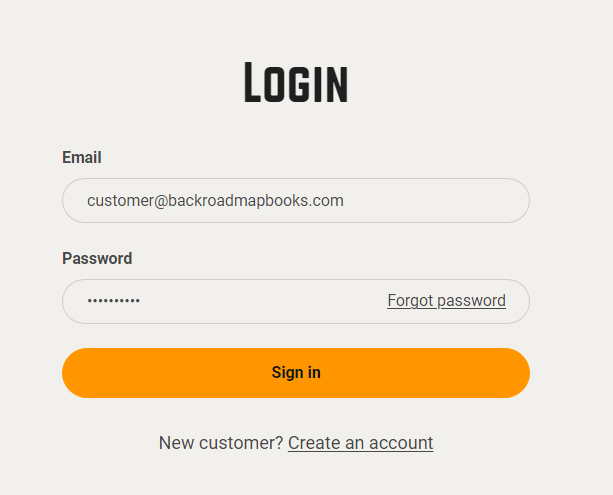
        " id="bkmrk-open-a-web-browser-a">1. Open a web browser and navigate to  
    `https://backrockodmapbooks.com`
2. Click **Sign In** (top‑right) and enter your account credentials.  
    [![2024-11-26 16_20_05-Account – Backroad Maps - Opera.png](https://brmb.support/uploads/images/gallery/2025-03/scaled-1680-/2024-11-26-16-20-05-account-backroad-maps-opera.png)](https://brmb.support/uploads/images/gallery/2025-03/2024-11-26-16-20-05-account-backroad-maps-opera.png)
</div>### 4.2 Navigate to the Digital Map Registration Page

<div class="
          max-w-full
          
          prose
          prose-neutral
          prose-headings:font-semibold
          prose:text-neutral-800
          prose-strong:font-semibold
          prose-ul:marker:text-neutral-700
          prose-li:marker:text-neutral-700
          prose-headings:text-neutral-800
          prose-pre:bg-transparent
          prose-pre:rounded-xl
          prose-pre:text-neutral-800
          prose-pre:font-normal
          prose-pre:my-0
          prose-pre:max-w-full
          prose-pre:pt-1
           [&_code:not(pre_code)]:text-neutral-700
          [&_code:not(pre_code)]:bg-neutral-100
          [&_code:not(pre_code)]:font-normal
          [&_code:not(pre_code)]:px-1.5
          [&_code:not(pre_code)]:py-0.5
          [&_code:not(pre_code)]:rounded-md
          [&_code:not(pre_code)]:text-[90%]
          [&_code:not(pre_code)]:before:hidden
          [&_code:not(pre_code)]:after:hidden
          dark:prose-invert
          dark:prose:text-neutral-200
          dark:prose-pre:bg-none
          dark:prose-headings:text-neutral-200
          dark:prose-strong:text-neutral-200
          dark:prose-pre:text-neutral-200
          dark:prose:pre:text-neutral-200
          dark:[&_code:not(pre_code)]:text-neutral-200
          dark:[&_code:not(pre_code)]:bg-neutral-800
          dark:[&_code:not(pre_code)]:font-normal
          dark:prose-ul:marker:text-neutral-300
          dark:prose-li:marker:text-neutral-300
          break-words
        " id="bkmrk-once-logged-in%2C-clic">1. Once logged in, click **My Account** → **Digital Maps** → **Register Your Digital Map**.  
     !\[Navigate to Digital Maps\](https://brmb.support/uploads/images/gallery/2025-03/scaled-1680-/reg.png)

</div>### 4.3 Enter the Registration Data

<div class="
          max-w-full
          
          prose
          prose-neutral
          prose-headings:font-semibold
          prose:text-neutral-800
          prose-strong:font-semibold
          prose-ul:marker:text-neutral-700
          prose-li:marker:text-neutral-700
          prose-headings:text-neutral-800
          prose-pre:bg-transparent
          prose-pre:rounded-xl
          prose-pre:text-neutral-800
          prose-pre:font-normal
          prose-pre:my-0
          prose-pre:max-w-full
          prose-pre:pt-1
           [&_code:not(pre_code)]:text-neutral-700
          [&_code:not(pre_code)]:bg-neutral-100
          [&_code:not(pre_code)]:font-normal
          [&_code:not(pre_code)]:px-1.5
          [&_code:not(pre_code)]:py-0.5
          [&_code:not(pre_code)]:rounded-md
          [&_code:not(pre_code)]:text-[90%]
          [&_code:not(pre_code)]:before:hidden
          [&_code:not(pre_code)]:after:hidden
          dark:prose-invert
          dark:prose:text-neutral-200
          dark:prose-pre:bg-none
          dark:prose-headings:text-neutral-200
          dark:prose-strong:text-neutral-200
          dark:prose-pre:text-neutral-200
          dark:prose:pre:text-neutral-200
          dark:[&_code:not(pre_code)]:text-neutral-200
          dark:[&_code:not(pre_code)]:bg-neutral-800
          dark:[&_code:not(pre_code)]:font-normal
          dark:prose-ul:marker:text-neutral-300
          dark:prose-li:marker:text-neutral-300
          break-words
        " id="bkmrk-field-input-example-"><table><thead><tr><th>Field</th><th>Input</th><th>Example</th></tr></thead><tbody><tr><td>**Access Code**</td><td>The code printed on the MicroSD card label.</td><td>`BCBC-7r3325caa-8cec-483d-97db-059d88f78f29`</td></tr><tr><td>**UnitID**</td><td>10‑digit GPS unit identifier.</td><td>`1234567890`</td></tr></tbody></table>

</div>> *The UnitID can be found under Settings → About on your GPS.*

<div class="
          max-w-full
          
          prose
          prose-neutral
          prose-headings:font-semibold
          prose:text-neutral-800
          prose-strong:font-semibold
          prose-ul:marker:text-neutral-700
          prose-li:marker:text-neutral-700
          prose-headings:text-neutral-800
          prose-pre:bg-transparent
          prose-pre:rounded-xl
          prose-pre:text-neutral-800
          prose-pre:font-normal
          prose-pre:my-0
          prose-pre:max-w-full
          prose-pre:pt-1
           [&_code:not(pre_code)]:text-neutral-700
          [&_code:not(pre_code)]:bg-neutral-100
          [&_code:not(pre_code)]:font-normal
          [&_code:not(pre_code)]:px-1.5
          [&_code:not(pre_code)]:py-0.5
          [&_code:not(pre_code)]:rounded-md
          [&_code:not(pre_code)]:text-[90%]
          [&_code:not(pre_code)]:before:hidden
          [&_code:not(pre_code)]:after:hidden
          dark:prose-invert
          dark:prose:text-neutral-200
          dark:prose-pre:bg-none
          dark:prose-headings:text-neutral-200
          dark:prose-strong:text-neutral-200
          dark:prose-pre:text-neutral-200
          dark:prose:pre:text-neutral-200
          dark:[&_code:not(pre_code)]:text-neutral-200
          dark:[&_code:not(pre_code)]:bg-neutral-800
          dark:[&_code:not(pre_code)]:font-normal
          dark:prose-ul:marker:text-neutral-300
          dark:prose-li:marker:text-neutral-300
          break-words
        " id="bkmrk--4"><div class="relative bg-neutral-100 dark:bg-neutral-800 rounded-2xl overflow-hidden my-6"><div class="flex justify-between select-none"><div class="text-[13px] text-neutral-500 dark:text-neutral-400 font-mono px-4 py-2">  
</div></div></div></div>```
Access Code:  BCBC-7r3325caa-8cec-483d-97db-059d88f78f29
UnitID:       1234567890
```

> [![entercodesDVD.png](https://brmb.support/uploads/images/gallery/2025-03/scaled-1680-/entercodesdvd.png)](https://brmb.support/uploads/images/gallery/2025-03/entercodesdvd.png)

### 4.4 Submit the Form

<div class="
          max-w-full
          
          prose
          prose-neutral
          prose-headings:font-semibold
          prose:text-neutral-800
          prose-strong:font-semibold
          prose-ul:marker:text-neutral-700
          prose-li:marker:text-neutral-700
          prose-headings:text-neutral-800
          prose-pre:bg-transparent
          prose-pre:rounded-xl
          prose-pre:text-neutral-800
          prose-pre:font-normal
          prose-pre:my-0
          prose-pre:max-w-full
          prose-pre:pt-1
           [&_code:not(pre_code)]:text-neutral-700
          [&_code:not(pre_code)]:bg-neutral-100
          [&_code:not(pre_code)]:font-normal
          [&_code:not(pre_code)]:px-1.5
          [&_code:not(pre_code)]:py-0.5
          [&_code:not(pre_code)]:rounded-md
          [&_code:not(pre_code)]:text-[90%]
          [&_code:not(pre_code)]:before:hidden
          [&_code:not(pre_code)]:after:hidden
          dark:prose-invert
          dark:prose:text-neutral-200
          dark:prose-pre:bg-none
          dark:prose-headings:text-neutral-200
          dark:prose-strong:text-neutral-200
          dark:prose-pre:text-neutral-200
          dark:prose:pre:text-neutral-200
          dark:[&_code:not(pre_code)]:text-neutral-200
          dark:[&_code:not(pre_code)]:bg-neutral-800
          dark:[&_code:not(pre_code)]:font-normal
          dark:prose-ul:marker:text-neutral-300
          dark:prose-li:marker:text-neutral-300
          break-words
        " id="bkmrk-review-the-values-yo">- Review the values you entered.
- Click **SUBMIT**.
- If registration succeeds, a green success message will appear and the new product will be listed under your account.

</div>> [![regsuccess.png](https://brmb.support/uploads/images/gallery/2025-03/scaled-1680-/regsuccess.png)](https://brmb.support/uploads/images/gallery/2025-03/regsuccess.png)

<div class="
          max-w-full
          
          prose
          prose-neutral
          prose-headings:font-semibold
          prose:text-neutral-800
          prose-strong:font-semibold
          prose-ul:marker:text-neutral-700
          prose-li:marker:text-neutral-700
          prose-headings:text-neutral-800
          prose-pre:bg-transparent
          prose-pre:rounded-xl
          prose-pre:text-neutral-800
          prose-pre:font-normal
          prose-pre:my-0
          prose-pre:max-w-full
          prose-pre:pt-1
           [&_code:not(pre_code)]:text-neutral-700
          [&_code:not(pre_code)]:bg-neutral-100
          [&_code:not(pre_code)]:font-normal
          [&_code:not(pre_code)]:px-1.5
          [&_code:not(pre_code)]:py-0.5
          [&_code:not(pre_code)]:rounded-md
          [&_code:not(pre_code)]:text-[90%]
          [&_code:not(pre_code)]:before:hidden
          [&_code:not(pre_code)]:after:hidden
          dark:prose-invert
          dark:prose:text-neutral-200
          dark:prose-pre:bg-none
          dark:prose-headings:text-neutral-200
          dark:prose-strong:text-neutral-200
          dark:prose-pre:text-neutral-200
          dark:prose:pre:text-neutral-200
          dark:[&_code:not(pre_code)]:text-neutral-200
          dark:[&_code:not(pre_code)]:bg-neutral-800
          dark:[&_code:not(pre_code)]:font-normal
          dark:prose-ul:marker:text-neutral-300
          dark:prose-li:marker:text-neutral-300
          break-words
        " id="bkmrk--7">---

</div>## 5. After Registration

<div class="
          max-w-full
          
          prose
          prose-neutral
          prose-headings:font-semibold
          prose:text-neutral-800
          prose-strong:font-semibold
          prose-ul:marker:text-neutral-700
          prose-li:marker:text-neutral-700
          prose-headings:text-neutral-800
          prose-pre:bg-transparent
          prose-pre:rounded-xl
          prose-pre:text-neutral-800
          prose-pre:font-normal
          prose-pre:my-0
          prose-pre:max-w-full
          prose-pre:pt-1
           [&_code:not(pre_code)]:text-neutral-700
          [&_code:not(pre_code)]:bg-neutral-100
          [&_code:not(pre_code)]:font-normal
          [&_code:not(pre_code)]:px-1.5
          [&_code:not(pre_code)]:py-0.5
          [&_code:not(pre_code)]:rounded-md
          [&_code:not(pre_code)]:text-[90%]
          [&_code:not(pre_code)]:before:hidden
          [&_code:not(pre_code)]:after:hidden
          dark:prose-invert
          dark:prose:text-neutral-200
          dark:prose-pre:bg-none
          dark:prose-headings:text-neutral-200
          dark:prose-strong:text-neutral-200
          dark:prose-pre:text-neutral-200
          dark:prose:pre:text-neutral-200
          dark:[&_code:not(pre_code)]:text-neutral-200
          dark:[&_code:not(pre_code)]:bg-neutral-800
          dark:[&_code:not(pre_code)]:font-normal
          dark:prose-ul:marker:text-neutral-300
          dark:prose-li:marker:text-neutral-300
          break-words
        " id="bkmrk-your-digital-maps-ar">- **Your digital maps are now registered** and available for download.
- The new product appears in the *My Gps Maps* section of your account.
- You can immediately start downloading the computer‑ready map files.

</div>> [![product.png](https://brmb.support/uploads/images/gallery/2025-03/scaled-1680-/product.png)](https://brmb.support/uploads/images/gallery/2025-03/product.png)

<div class="
          max-w-full
          
          prose
          prose-neutral
          prose-headings:font-semibold
          prose:text-neutral-800
          prose-strong:font-semibold
          prose-ul:marker:text-neutral-700
          prose-li:marker:text-neutral-700
          prose-headings:text-neutral-800
          prose-pre:bg-transparent
          prose-pre:rounded-xl
          prose-pre:text-neutral-800
          prose-pre:font-normal
          prose-pre:my-0
          prose-pre:max-w-full
          prose-pre:pt-1
           [&_code:not(pre_code)]:text-neutral-700
          [&_code:not(pre_code)]:bg-neutral-100
          [&_code:not(pre_code)]:font-normal
          [&_code:not(pre_code)]:px-1.5
          [&_code:not(pre_code)]:py-0.5
          [&_code:not(pre_code)]:rounded-md
          [&_code:not(pre_code)]:text-[90%]
          [&_code:not(pre_code)]:before:hidden
          [&_code:not(pre_code)]:after:hidden
          dark:prose-invert
          dark:prose:text-neutral-200
          dark:prose-pre:bg-none
          dark:prose-headings:text-neutral-200
          dark:prose-strong:text-neutral-200
          dark:prose-pre:text-neutral-200
          dark:prose:pre:text-neutral-200
          dark:[&_code:not(pre_code)]:text-neutral-200
          dark:[&_code:not(pre_code)]:bg-neutral-800
          dark:[&_code:not(pre_code)]:font-normal
          dark:prose-ul:marker:text-neutral-300
          dark:prose-li:marker:text-neutral-300
          break-words
        " id="bkmrk--9">---

</div>## 6. Post‑Registration Tasks

<div class="
          max-w-full
          
          prose
          prose-neutral
          prose-headings:font-semibold
          prose:text-neutral-800
          prose-strong:font-semibold
          prose-ul:marker:text-neutral-700
          prose-li:marker:text-neutral-700
          prose-headings:text-neutral-800
          prose-pre:bg-transparent
          prose-pre:rounded-xl
          prose-pre:text-neutral-800
          prose-pre:font-normal
          prose-pre:my-0
          prose-pre:max-w-full
          prose-pre:pt-1
           [&_code:not(pre_code)]:text-neutral-700
          [&_code:not(pre_code)]:bg-neutral-100
          [&_code:not(pre_code)]:font-normal
          [&_code:not(pre_code)]:px-1.5
          [&_code:not(pre_code)]:py-0.5
          [&_code:not(pre_code)]:rounded-md
          [&_code:not(pre_code)]:text-[90%]
          [&_code:not(pre_code)]:before:hidden
          [&_code:not(pre_code)]:after:hidden
          dark:prose-invert
          dark:prose:text-neutral-200
          dark:prose-pre:bg-none
          dark:prose-headings:text-neutral-200
          dark:prose-strong:text-neutral-200
          dark:prose-pre:text-neutral-200
          dark:prose:pre:text-neutral-200
          dark:[&_code:not(pre_code)]:text-neutral-200
          dark:[&_code:not(pre_code)]:bg-neutral-800
          dark:[&_code:not(pre_code)]:font-normal
          dark:prose-ul:marker:text-neutral-300
          dark:prose-li:marker:text-neutral-300
          break-words
        " id="bkmrk-download-the-compute">1. **Download the computer‑map files**:
    
    
    - From your account, click **Download** next to the registered product.
    - Choose *macOS* or *Windows* as required.
    - Follow the on‑screen prompts to install.
2. **Backup your license files**:
    
    
    - You can also download a copy of your Garmin license/unlock files from the portal for local backup.
3. **Schedule future updates**:
    
    
    - Within the 60‑day free window, simply click **Get Updates** in the portal.

---

</div>## 7. Troubleshooting

<div class="
          max-w-full
          
          prose
          prose-neutral
          prose-headings:font-semibold
          prose:text-neutral-800
          prose-strong:font-semibold
          prose-ul:marker:text-neutral-700
          prose-li:marker:text-neutral-700
          prose-headings:text-neutral-800
          prose-pre:bg-transparent
          prose-pre:rounded-xl
          prose-pre:text-neutral-800
          prose-pre:font-normal
          prose-pre:my-0
          prose-pre:max-w-full
          prose-pre:pt-1
           [&_code:not(pre_code)]:text-neutral-700
          [&_code:not(pre_code)]:bg-neutral-100
          [&_code:not(pre_code)]:font-normal
          [&_code:not(pre_code)]:px-1.5
          [&_code:not(pre_code)]:py-0.5
          [&_code:not(pre_code)]:rounded-md
          [&_code:not(pre_code)]:text-[90%]
          [&_code:not(pre_code)]:before:hidden
          [&_code:not(pre_code)]:after:hidden
          dark:prose-invert
          dark:prose:text-neutral-200
          dark:prose-pre:bg-none
          dark:prose-headings:text-neutral-200
          dark:prose-strong:text-neutral-200
          dark:prose-pre:text-neutral-200
          dark:prose:pre:text-neutral-200
          dark:[&_code:not(pre_code)]:text-neutral-200
          dark:[&_code:not(pre_code)]:bg-neutral-800
          dark:[&_code:not(pre_code)]:font-normal
          dark:prose-ul:marker:text-neutral-300
          dark:prose-li:marker:text-neutral-300
          break-words
        " id="bkmrk-symptom-likely-cause"><table><thead><tr><th>Symptom</th><th>Likely Cause</th><th>Fix</th></tr></thead><tbody><tr><td>Registration fails with *“Invalid Access Code”*</td><td>Wrong Access Code or UnitID entered</td><td>Re‑check the GPS UnitID.</td></tr><tr><td>Registration fails with *“UnitID already registered”*</td><td>The same UnitID was registered previously</td><td>Contact support; you may have a duplicate product or need to unlink the old registration.</td></tr><tr><td>Unable to download updates after 60 days</td><td>The free update window has expired</td><td>Purchase the latest map edition through the portal.</td></tr><tr><td>Green success box never appears</td><td>Browser security block (e.g., pop‑up blocker)</td><td>Disable pop‑up blockers or try a different browser.</td></tr></tbody></table>

---

</div>## 8. FAQ

**Q1. Can I use the Digital maps on multiple GPS devices?**  
A1. No – the registration is tied to your GPS UnitID, You can only load the maps on the registered GPS.

**Q2. Do I need to install the Digital maps to a MicroSD card ?**  
A2. No, the Digital maps allow you to install the maps on the internal memory or your own microSD card.

<div class="
          max-w-full
          
          prose
          prose-neutral
          prose-headings:font-semibold
          prose:text-neutral-800
          prose-strong:font-semibold
          prose-ul:marker:text-neutral-700
          prose-li:marker:text-neutral-700
          prose-headings:text-neutral-800
          prose-pre:bg-transparent
          prose-pre:rounded-xl
          prose-pre:text-neutral-800
          prose-pre:font-normal
          prose-pre:my-0
          prose-pre:max-w-full
          prose-pre:pt-1
           [&_code:not(pre_code)]:text-neutral-700
          [&_code:not(pre_code)]:bg-neutral-100
          [&_code:not(pre_code)]:font-normal
          [&_code:not(pre_code)]:px-1.5
          [&_code:not(pre_code)]:py-0.5
          [&_code:not(pre_code)]:rounded-md
          [&_code:not(pre_code)]:text-[90%]
          [&_code:not(pre_code)]:before:hidden
          [&_code:not(pre_code)]:after:hidden
          dark:prose-invert
          dark:prose:text-neutral-200
          dark:prose-pre:bg-none
          dark:prose-headings:text-neutral-200
          dark:prose-strong:text-neutral-200
          dark:prose-pre:text-neutral-200
          dark:prose:pre:text-neutral-200
          dark:[&_code:not(pre_code)]:text-neutral-200
          dark:[&_code:not(pre_code)]:bg-neutral-800
          dark:[&_code:not(pre_code)]:font-normal
          dark:prose-ul:marker:text-neutral-300
          dark:prose-li:marker:text-neutral-300
          break-words
        " id="bkmrk--10">---

</div>## 9. Contact &amp; Support

<div class="
          max-w-full
          
          prose
          prose-neutral
          prose-headings:font-semibold
          prose:text-neutral-800
          prose-strong:font-semibold
          prose-ul:marker:text-neutral-700
          prose-li:marker:text-neutral-700
          prose-headings:text-neutral-800
          prose-pre:bg-transparent
          prose-pre:rounded-xl
          prose-pre:text-neutral-800
          prose-pre:font-normal
          prose-pre:my-0
          prose-pre:max-w-full
          prose-pre:pt-1
           [&_code:not(pre_code)]:text-neutral-700
          [&_code:not(pre_code)]:bg-neutral-100
          [&_code:not(pre_code)]:font-normal
          [&_code:not(pre_code)]:px-1.5
          [&_code:not(pre_code)]:py-0.5
          [&_code:not(pre_code)]:rounded-md
          [&_code:not(pre_code)]:text-[90%]
          [&_code:not(pre_code)]:before:hidden
          [&_code:not(pre_code)]:after:hidden
          dark:prose-invert
          dark:prose:text-neutral-200
          dark:prose-pre:bg-none
          dark:prose-headings:text-neutral-200
          dark:prose-strong:text-neutral-200
          dark:prose-pre:text-neutral-200
          dark:prose:pre:text-neutral-200
          dark:[&_code:not(pre_code)]:text-neutral-200
          dark:[&_code:not(pre_code)]:bg-neutral-800
          dark:[&_code:not(pre_code)]:font-normal
          dark:prose-ul:marker:text-neutral-300
          dark:prose-li:marker:text-neutral-300
          break-words
        " id="bkmrk-channel-availability"><table><thead><tr><th>Channel</th><th>Availability</th><th>Notes</th></tr></thead><tbody><tr><td>**Email**</td><td>Mon‑Fri 9:00‑17:00 PST</td><td>gps&lt;at&gt;backroadmapbooks.com</td></tr><tr><td>**Phone**</td><td>Mon‑Fri 9:00‑17:00 PST</td><td>(877)-520-5670 </td></tr></tbody></table>

</div>> For urgent issues, reference the *UnitID* and *Access Code* in your support request.

<div class="
          max-w-full
          
          prose
          prose-neutral
          prose-headings:font-semibold
          prose:text-neutral-800
          prose-strong:font-semibold
          prose-ul:marker:text-neutral-700
          prose-li:marker:text-neutral-700
          prose-headings:text-neutral-800
          prose-pre:bg-transparent
          prose-pre:rounded-xl
          prose-pre:text-neutral-800
          prose-pre:font-normal
          prose-pre:my-0
          prose-pre:max-w-full
          prose-pre:pt-1
           [&_code:not(pre_code)]:text-neutral-700
          [&_code:not(pre_code)]:bg-neutral-100
          [&_code:not(pre_code)]:font-normal
          [&_code:not(pre_code)]:px-1.5
          [&_code:not(pre_code)]:py-0.5
          [&_code:not(pre_code)]:rounded-md
          [&_code:not(pre_code)]:text-[90%]
          [&_code:not(pre_code)]:before:hidden
          [&_code:not(pre_code)]:after:hidden
          dark:prose-invert
          dark:prose:text-neutral-200
          dark:prose-pre:bg-none
          dark:prose-headings:text-neutral-200
          dark:prose-strong:text-neutral-200
          dark:prose-pre:text-neutral-200
          dark:prose:pre:text-neutral-200
          dark:[&_code:not(pre_code)]:text-neutral-200
          dark:[&_code:not(pre_code)]:bg-neutral-800
          dark:[&_code:not(pre_code)]:font-normal
          dark:prose-ul:marker:text-neutral-300
          dark:prose-li:marker:text-neutral-300
          break-words
        " id="bkmrk--11">---

</div>

# Installing Maps for Garmin Basecamp [ MAC ]

# Basecamp Map Installation [ MAC ]

# Installing and Unlocking Backroad MapBooks on macOS  

---

## 1. Prerequisites  

| Item | What to do | Link |
|------|------------|------|
| **Garmin Basecamp** | Install Basecamp to view and load maps. | <https://www8.garmin.com/support/download_details.jsp?id=4449> |
| **Backroad MapBooks account** | Sign‑up or log in to access map downloads. | <https://www.backroadmapbooks.com/brmb-products/customer/account/login/> |

> **Tip** – Keep the ZIP file in your **Downloads** folder for quick access.

---

## 2. Downloading the Map Archive for macOS  

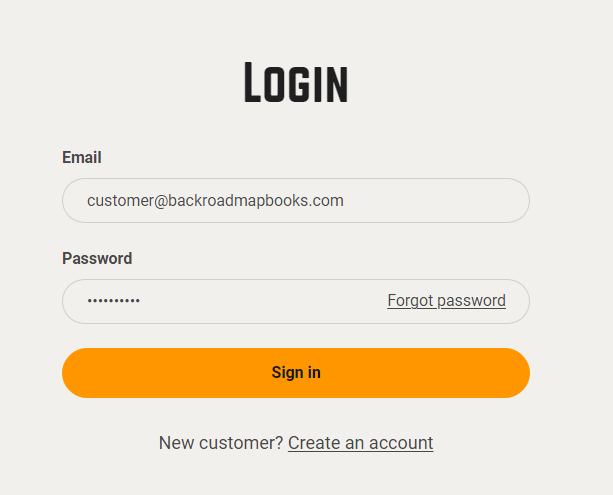
1. **Log into the Backroad MapBooks website**  
   * Open the URL above and sign in.  
   * If you have no account, click **Create New Account** and follow the prompts.
![Login screen](https://brmb.support/uploads/images/gallery/2025-03/2024-11-26-16-20-05-account-backroad-maps-opera.png)

2. **Navigate to “MY GPS Maps”**  
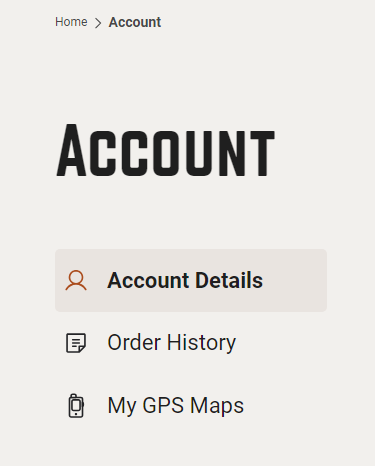
   * Click the **MY GPS Maps** button to open the registration page.

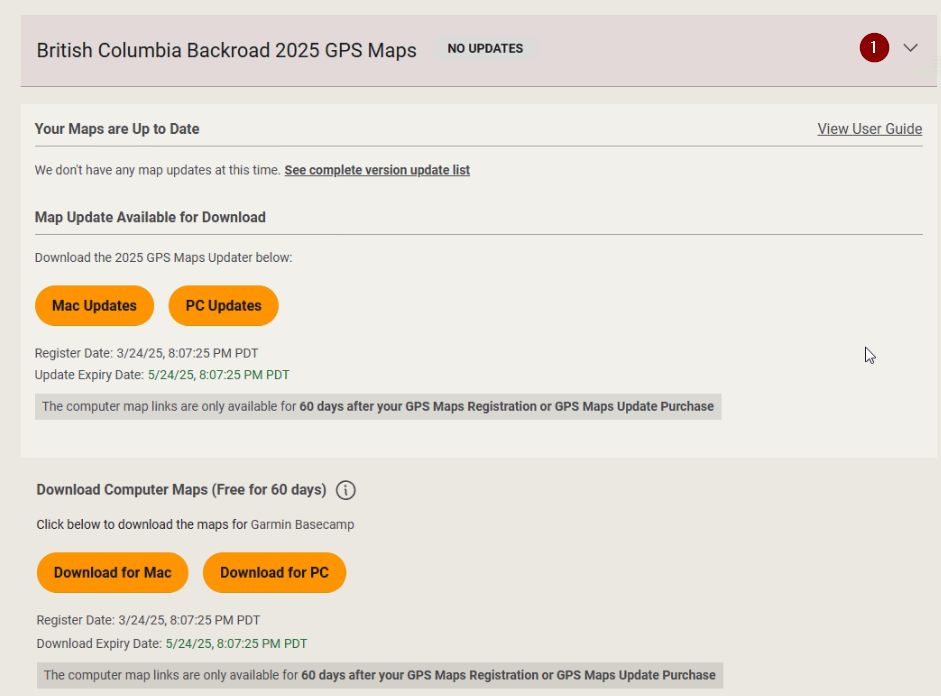
3. **Locate your product**  
   * Find the row for your province (e.g., *BC2025*).  
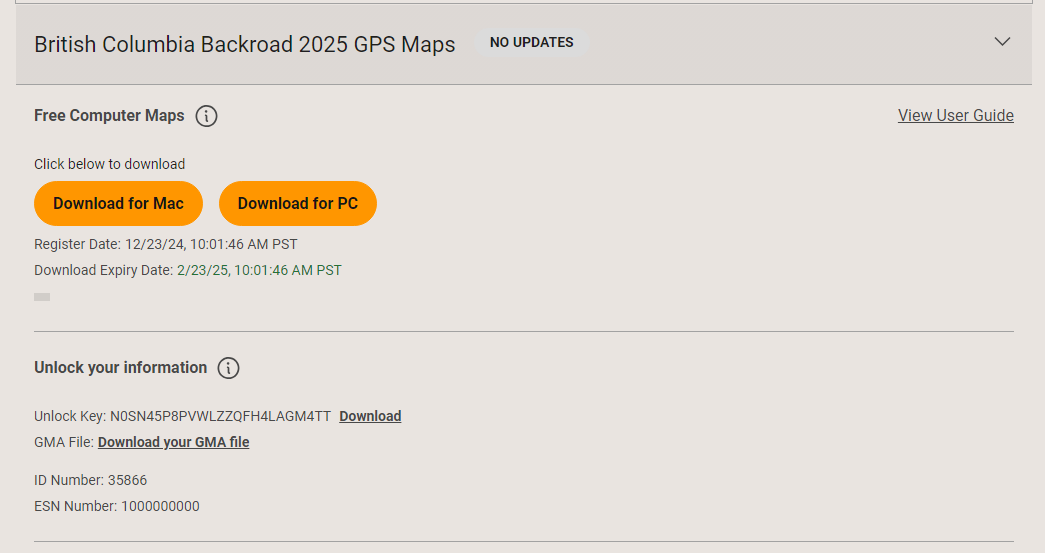
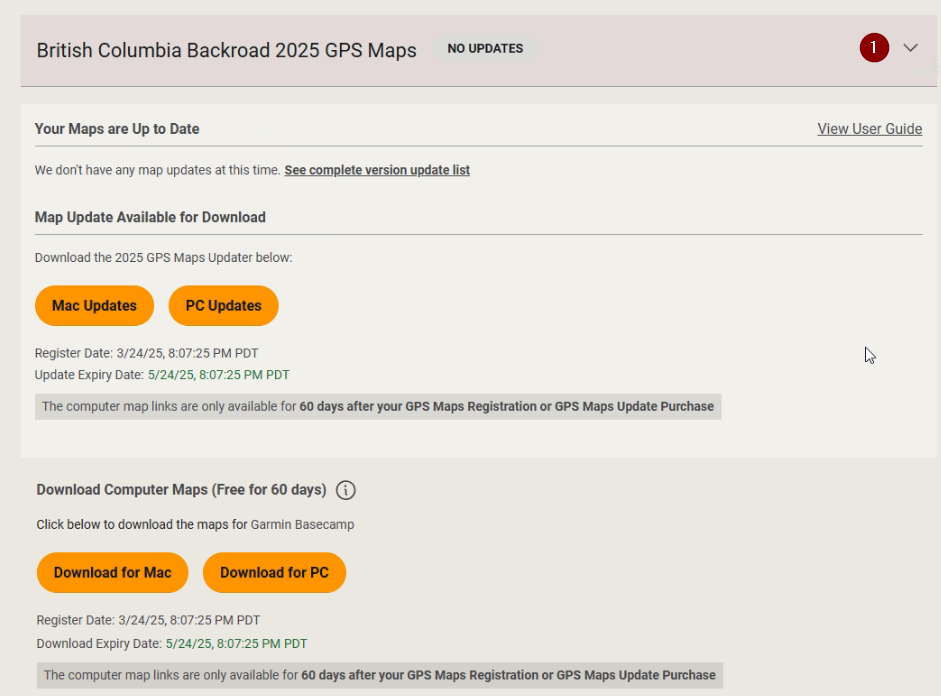
   * Click the **small arrow** to the right of the product title to expand its details.
![Product row](https://brmb.support/uploads/images/gallery/2025-03/download2.png)

4. **Download the macOS ZIP**  
   * Click the **Download for MAC** button.  
   * Choose a location to save it (default is the **Downloads** folder).

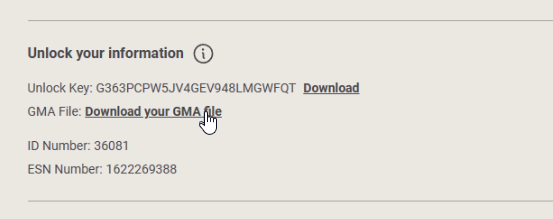
5. **Download the .gma unlock file**  
   * Scroll down to the **Unlock Information** section and click the link to download your **`.gma`** file.
![Unlock file](https://brmb.support/uploads/images/gallery/2025-03/macgms.png)
 ---

## 3. Installing the Maps

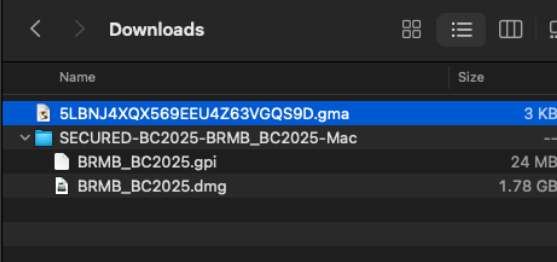
1. **Open the downloaded ZIP**  
   * Navigate to where you saved the file.  
   * If it hasn't already extracted, double‑click the ZIP to unpack it (you should see a folder named `SECURED_BC2025_BRMB_BC2025-Mac`).

2. **Mount the DMG**  
   * Inside that folder you’ll find a **`.dmg`** file (e.g., `BRMB_BC2025.dmg`).  
   * Double‑click the DMG to mount it.  
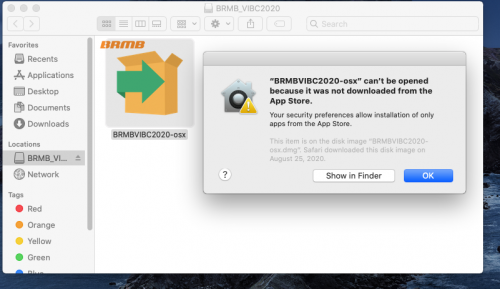
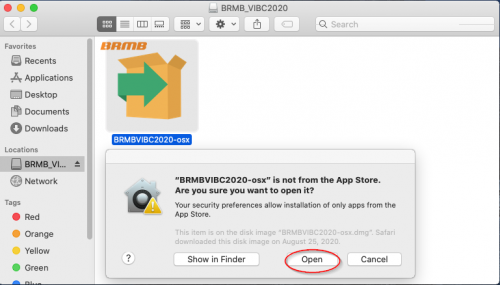
   * If you get a “Not from the App Store” warning, click **OK** and then **Open** the installer.

3. **Run the installer**  
   * Double‑click the installer icon that appears inside the mounted volume.  
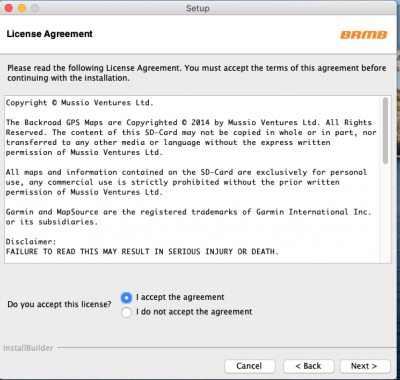
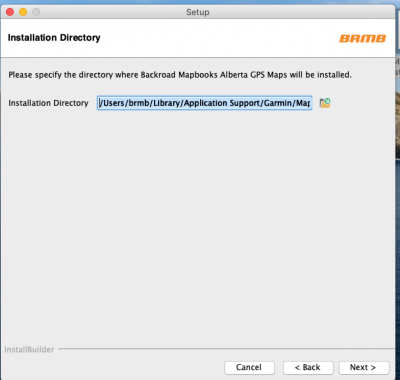
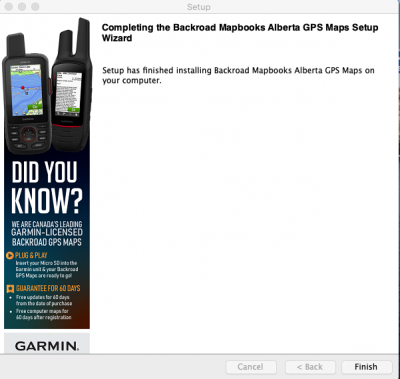
   * Follow the on‑screen prompts (accept the license, choose an installation directory, and finish).
[![![DMG folder](https://brmb.support/uploads/images/gallery/2025-03/macdigital12.png)](https://brmb.support/uploads/images/gallery/2025-03/scaled-1680-/macdigital4.png)](https://brmb.support/uploads/images/gallery/2025-03/macdigital4.png) 

4. **Allow apps from unidentified developers** *(if needed)*  
   * Open **System Preferences → Security & Privacy → General**.  
   * If “Allow apps downloaded from: Anywhere” is not present, click **Open Anyway** after launching the installer.  
   * For detailed steps, see Apple’s guide: <https://support.apple.com/en-ca/guide/mac-help/mh40616/mac>.
   ![Security dialog](https://brmb.support/uploads/images/gallery/2022-07/mac-sec1.png)  
   ![Security dialog – 2](https://brmb.support/uploads/images/gallery/2022-07/mac-sec3.png)

5. **Follow the installation steps**  
   * The installer will show a welcome screen, license agreement, and a final confirmation screen.  
   * Once finished, you’ll be ready to unlock the maps.

6. **Complete the installation**  
   * Follow the on‑screen prompts (welcome, license, install location).  
   * Typical screens:
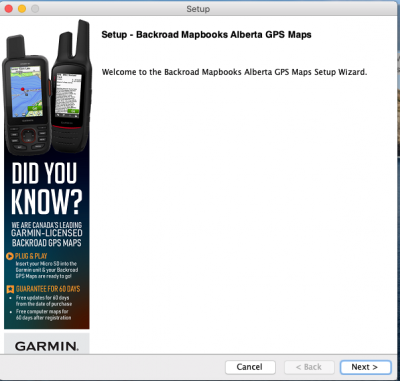

     ![Welcome](https://brmb.support/uploads/images/gallery/2022-07/welcome.png)  
     ![License](https://brmb.support/uploads/images/gallery/2022-07/license.png)  
     ![Install directory](https://brmb.support/uploads/images/gallery/2022-07/install-dir.png)  
     ![Finish](https://brmb.support/uploads/images/gallery/2022-07/KDkfinal.png)

---
---

## 4. Unlocking the Maps in Garmin Basecamp (macOS)

After the installation above, follow the unlocking instructions at:

<https://brmb.support/books/3mac-gps-support/page/unlocking-maps-in-basecamp-for-mac>

*(This page walks you through importing the `.gma` file into Basecamp and unlocking the content.)*

---

## 5. Troubleshooting  

| Problem | Fix |
|---------|-----|
| **Installer won’t launch** – “This app cannot be opened because it is from an unidentified developer.” | 1. Open the installer once. <br> 2. Close it. <br> 3. Go to **System Preferences → Security & Privacy → General** and click **Open Anyway**. |

---

## 6. Need More Help?

* **Phone** – 1-877-520-5670  
* **Submit Support Request** – > <https://backroadmapshelp.zendesk.com/hc/en-us/requests/new>   

We’re here to help you get your maps up and running as quickly as possible!

# Unlocking Maps in Basecamp for MAC

# Unlocking BackroadMaps in Garmin Basecamp for macOS

> **Goal** – Import the `.gma` unlock key so your BackroadMaps are activated in Basecamp on a Mac.

> **Prerequisites** –  
> * Garmin Basecamp and Map Manager installed on your Mac.  
> * A `.gma` file either downloaded from your Backroad Maps account or located on the microSD card in the `Garmin` folder.

---

## 1. Locate the `.gma` Unlock Key

| Source | Where to Find It |
|--------|------------------|
| **Your account** | Log in to the Backroad Maps portal → **My Unlock Keys** → download the file (usually named *`YourUnlockKey.gma`*). |
| **microSD card** | Inside the microSD card → `Garmin` folder → file *`gmapsupp.gma`* (if the card hasn’t been updated) or *`YourUnlockKey.gma`* (if the card has been updated). |


![Unlock key locations](https://brmb.support/uploads/images/gallery/2025-03/macgms.png)

> The file is always named **`.gma`** – the name will differ based on the card’s update status.
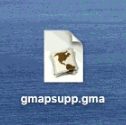

 ![Example file names](https://brmb.support/uploads/images/gallery/2022-07/mac-gma.png)

---

## 2. Open Map Manager

1. **Navigate** to the folder containing the `.gma` file.  
2. **Double‑click** the `.gma` file.  

   *A “Map Manager” window appears, asking whether you’d like to install the maps.*  
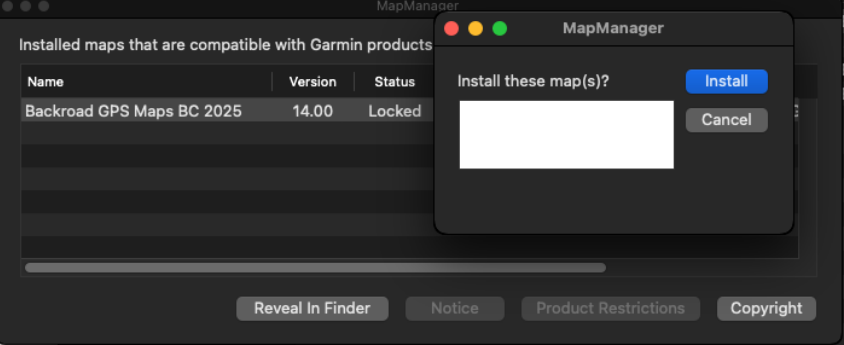

   ![Map Manager prompt – Install](https://brmb.support/uploads/images/gallery/2025-03/macdigital13.png)

3. Click **`INSTALL`** to start the unlocking process.
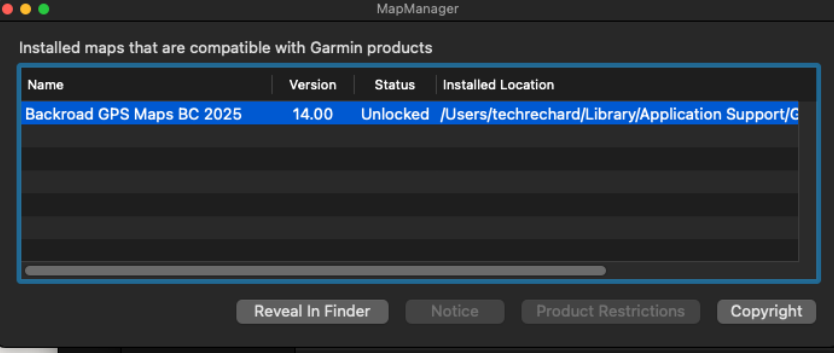

   ![Map Manager prompt – Confirmation](https://brmb.support/uploads/images/gallery/2025-03/macdigital14.png)


---

## 3. Verify Successful Unlock

Once installation completes:

1. Open **Garmin Basecamp**.  
2. Go to **Maps → Manage Map Products**.  
3. The relevant BackroadMap entry should now display **“Region unlock code from …”** next to its name, indicating it is unlocked.

---

## 4. Troubleshooting

| Issue | Likely Cause | Fix |
|-------|--------------|-----|
| Map Manager doesn’t open when double‑clicking `.gma` | File not recognized | Verify the Map Manager application is installed. |
| Security block (“This application cannot be opened”) | macOS Gatekeeper | Use **System Settings → Security & Privacy → General** to allow the file, then retry. |

---

## 5. Need More Help?

* **Phone** – 1-877-520-5670  
* **Submit Support Request** – > <https://backroadmapshelp.zendesk.com/hc/en-us/requests/new>   

We’re here to help you get your maps up and running as quickly as possible!

# Updating Maps [MAC]

### <span style="text-decoration:underline;">Map Updates</span>

Map updates are released each year and older versions become discontinued.

<p class="callout danger">To update your card it must be registered in your account. Updates are shown under your existing registered product.</p>

<p class="callout danger">Updates are available FREE for 60 days after registration. Not Registered Yet? [Register Here](https://backroadmapbooks.com/account/register)</p>

### <span style="text-decoration:underline;"><span style="white-space:pre;">**Connecting your GPS**</span></span>

*<span style="white-space:pre;">**Some units may need to be placed into:**</span>*

> <span style="white-space:pre;">**Mass storage mode** - [Viewing Files Using USB Mass Storage Mode](https://support.garmin.com/en-CA/?faq=X35K6CZPuG2nMOycjxSvs7)</span>
> 
> **<span style="white-space:pre;">MTP mode </span>**
> 
> <span style="white-space:pre;">**Spanner Mode** - [Garmin Spanner Mode on an Outdoor Product](https://support.garmin.com/en-US/?faq=rhRRn7BCMJ4KuWmxFcBKN7)</span>

*<span style="white-space:pre;">These settings can be changed on your unit before you plug it into your computer.</span>*

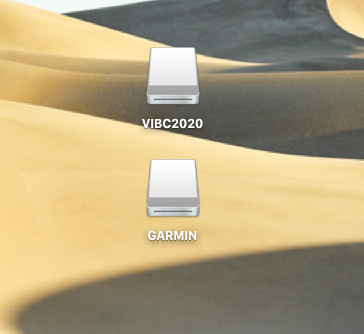
This will give you a drive for the Garmin unit and one for our microSD card.

[![mac-drives.png](https://brmb.support/uploads/images/gallery/2022-07/scaled-1680-/mac-drives.png)](https://brmb.support/uploads/images/gallery/2022-07/mac-drives.png)
### <span style="text-decoration:underline;">Updating Maps</span>

1\. <span class="f_BodyText" style="font-family:'Zurich BT';">Go to the our website at [Backroadmapbooks](http://www.backroadmapbooks.com/brmb-products/customer/account/login/)</span>

<span class="f_BodyText" style="font-family:'Zurich BT';">Log into your account on our website, create a new account if you don't have one.</span>

[![2024-11-26 16_20_05-Account – Backroad Maps - Opera.png](https://brmb.support/uploads/images/gallery/2025-03/scaled-1680-/2024-11-26-16-20-05-account-backroad-maps-opera.png)](https://brmb.support/uploads/images/gallery/2025-03/2024-11-26-16-20-05-account-backroad-maps-opera.png)

<span class="f_BodyText" style="font-family:'Zurich BT';">2. Click on the "MY GPS Maps" button to go to the registration page.</span>

[![2024-11-26 16_20_45-Account – Backroad Maps - Opera.png](https://brmb.support/uploads/images/gallery/2025-03/scaled-1680-/2024-11-26-16-20-45-account-backroad-maps-opera.png)](https://brmb.support/uploads/images/gallery/2025-03/2024-11-26-16-20-45-account-backroad-maps-opera.png)

<span style="white-space:pre;">4.) Click the down arrow to expand the product information,</span>

<span style="white-space:pre;">[![download2.png](https://brmb.support/uploads/images/gallery/2025-03/scaled-1680-/download2.png)](https://brmb.support/uploads/images/gallery/2025-03/download2.png)</span>

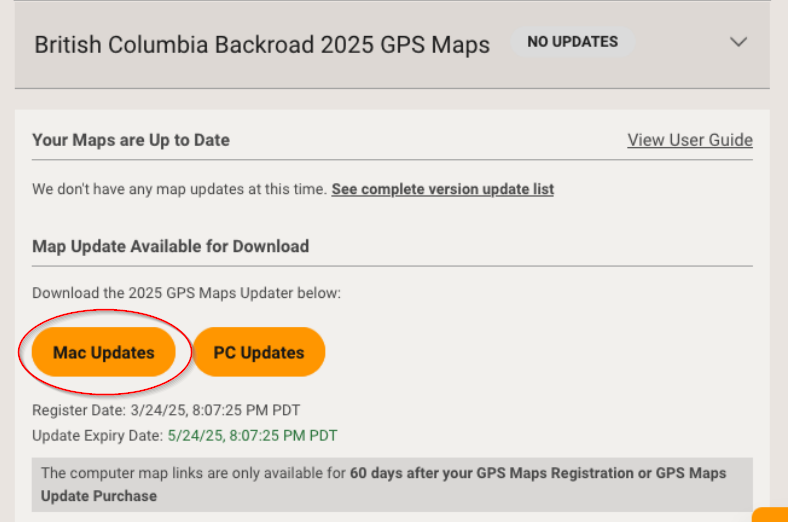
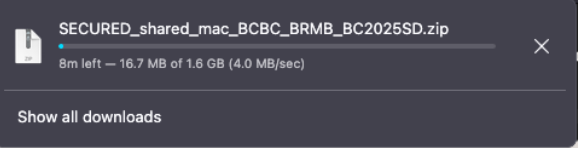
<span style="white-space:pre;">5.)Under **Map Updates Available for Download** Click Mac Updates to download the .zip archive to your computer.</span>

[![Macupdate3.png](https://brmb.support/uploads/images/gallery/2025-03/scaled-1680-/macupdate3.png)](https://brmb.support/uploads/images/gallery/2025-03/macupdate3.png)

<span style="white-space:pre;">[![Macupdate5.png](https://brmb.support/uploads/images/gallery/2025-03/scaled-1680-/macupdate5.png)](https://brmb.support/uploads/images/gallery/2025-03/macupdate5.png)</span>

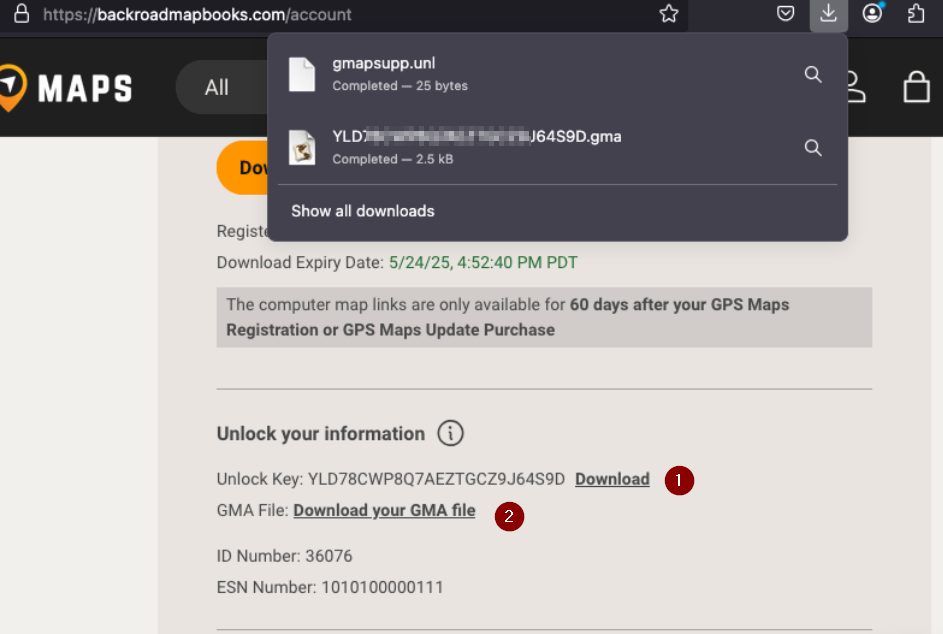
<span style="white-space:pre;">6.) Under **Unlock Information** Click to download your gma and unl files for the updated version.</span>

<span style="white-space:pre;">[![Macupdate4.png](https://brmb.support/uploads/images/gallery/2025-03/scaled-1680-/macupdate4.png)](https://brmb.support/uploads/images/gallery/2025-03/macupdate4.png)</span>

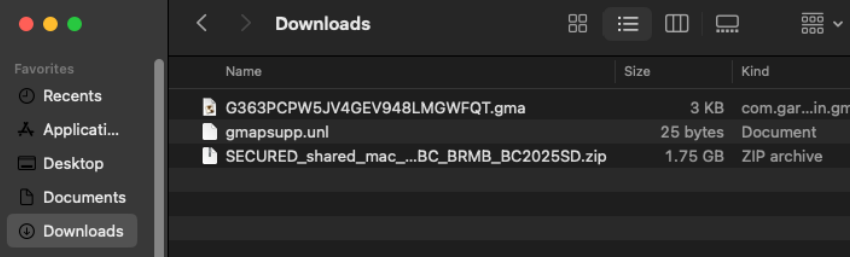
<span style="white-space:pre;">Navigate to the location of the downloaded .zip file.</span>

<span style="white-space:pre;">[![Macupdate6.png](https://brmb.support/uploads/images/gallery/2025-03/scaled-1680-/macupdate6.png)](https://brmb.support/uploads/images/gallery/2025-03/macupdate6.png)</span>

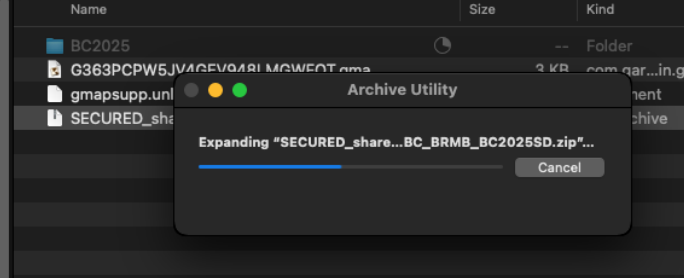
<span style="white-space:pre;">7.) Expand the .zip archive to show the update folder and files.</span>

*<span style="white-space:pre;">**[![Macupdate7.png](https://brmb.support/uploads/images/gallery/2025-03/scaled-1680-/macupdate7.png)](https://brmb.support/uploads/images/gallery/2025-03/macupdate7.png)**</span>*

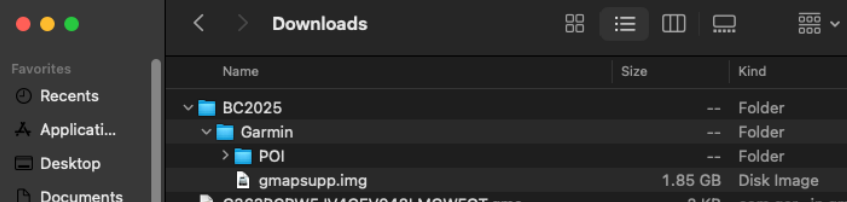
<span style="white-space:pre;">8.)The zip file will expand to a folder with the name of your Product.</span>

<span style="white-space:pre;">In this example ***BC2025*** and contains the Garmin Folder and files to update your microSD card.</span>

<span style="white-space:pre;">[![Macupdate8.png](https://brmb.support/uploads/images/gallery/2025-03/scaled-1680-/macupdate8.png)](https://brmb.support/uploads/images/gallery/2025-03/macupdate8.png)</span>

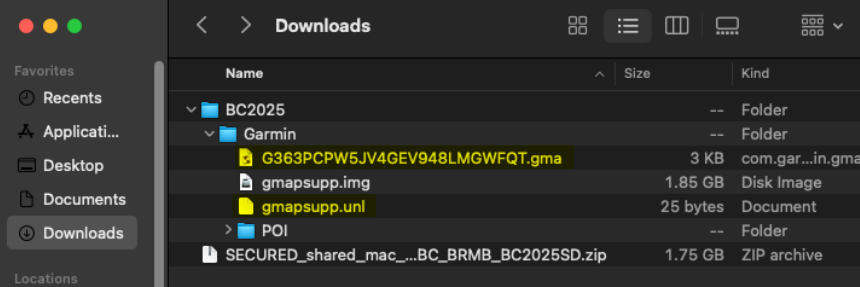
<span style="white-space:pre;">9.)Copy the .gma file and the .unl file into the Garmin folder containing the .img file and POI folder</span>

<span style="white-space:pre;">[![Macupdate9.png](https://brmb.support/uploads/images/gallery/2025-03/scaled-1680-/macupdate9.png)](https://brmb.support/uploads/images/gallery/2025-03/macupdate9.png)</span>

### **Backup your existing Card**

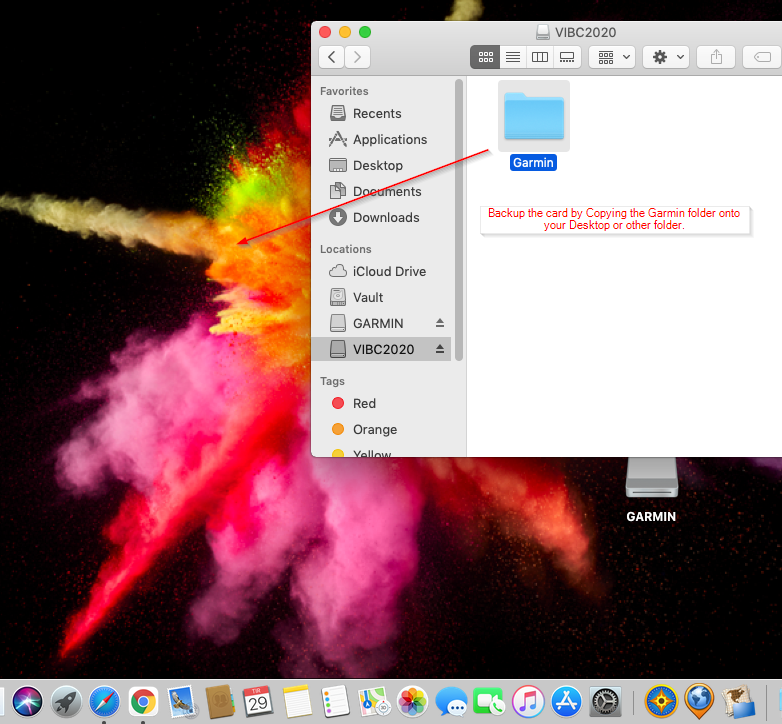
1\. Navigate to your existing microSD card drive.

Copy or drag the **Garmin folder** onto your Desktop or another location for backup purposes.

[![mac-backup-update.png](https://brmb.support/uploads/images/gallery/2022-07/scaled-1680-/mac-backup-update.png)](https://brmb.support/uploads/images/gallery/2022-07/mac-backup-update.png)
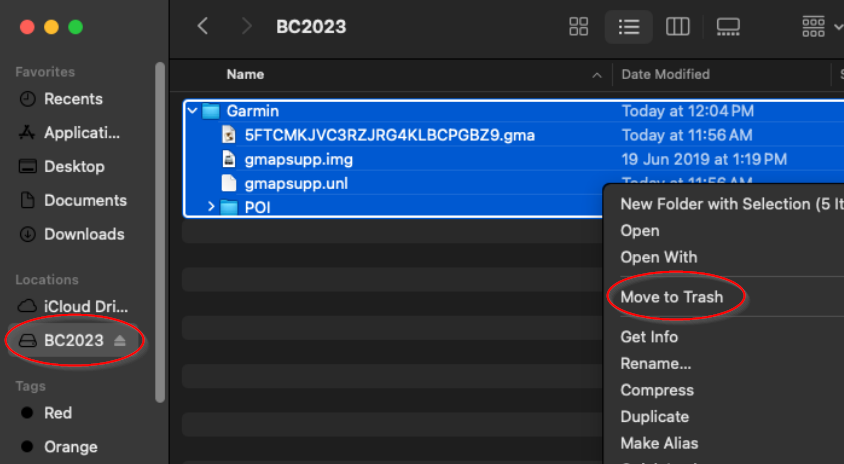
2.Once the backup is complete you can move the Garmin folder on the microSD card to Trash.

[![Macupdate10.png](https://brmb.support/uploads/images/gallery/2025-03/scaled-1680-/macupdate10.png)](https://brmb.support/uploads/images/gallery/2025-03/macupdate10.png)
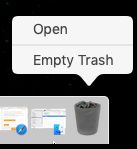
3\. To free the space on the card you will need to empty the trash

[![empty-trash.png](https://brmb.support/uploads/images/gallery/2022-07/scaled-1680-/empty-trash.png)](https://brmb.support/uploads/images/gallery/2022-07/empty-trash.png)
### **Copy the new Garmin folder onto the card**

1.Navigate to the location of your new 2025 Garmin folder and copy it.

[![Macupdate12.png](https://brmb.support/uploads/images/gallery/2025-03/scaled-1680-/macupdate12.png)](https://brmb.support/uploads/images/gallery/2025-03/macupdate12.png)
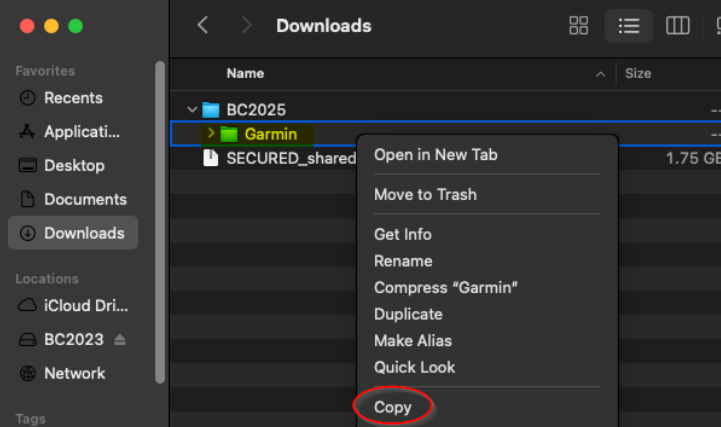
2\. Navigate to your MicroSD card and paste the new Garmin folder

[![Macupdate13.png](https://brmb.support/uploads/images/gallery/2025-03/scaled-1680-/macupdate13.png)](https://brmb.support/uploads/images/gallery/2025-03/macupdate13.png)
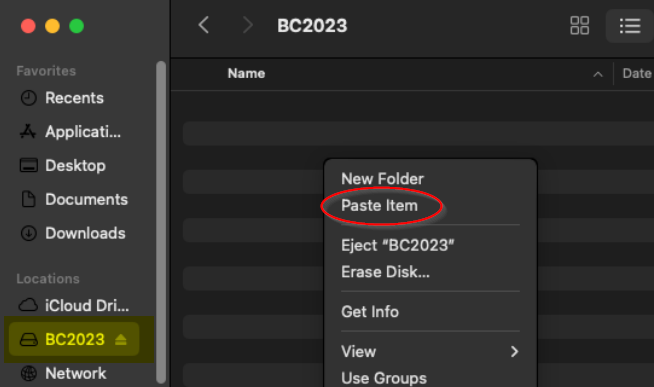
3\. Wait for the files to copied to your microSD card.

[![Macupdate15.png](https://brmb.support/uploads/images/gallery/2025-03/scaled-1680-/macupdate15.png)](https://brmb.support/uploads/images/gallery/2025-03/macupdate15.png)
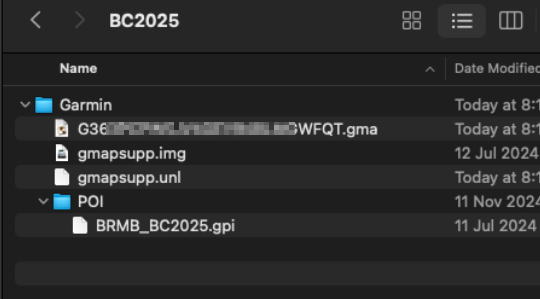
##### *Your microSD card should now be Updated with the latest map data and you can disconnect your GPS and test the maps.*


### Rename the card \*Optional

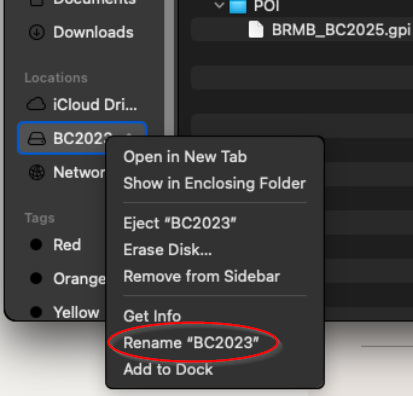
<p class="callout info">Your existing microSD card will still have the old version name so you will need to rename the drive.</p>

 [![Macupdate14.png](https://brmb.support/uploads/images/gallery/2025-03/scaled-1680-/macupdate14.png)](https://brmb.support/uploads/images/gallery/2025-03/macupdate14.png)

# Installing Backroad GPS Maps Digital [MAC]

Backroad Maps DIGITAL Maps are installed directly to your GPS unit memory, your own SD card or your Garmin Smart Watch

Building and installing your maps can be done using Garmin Basecamp and Mapinstall.

#### <span style="text-decoration:underline;">Connect your GPS to your computer</span>

[Connect GPS to computer](https://brmb.support/books/2windows-gps-support/page/troubleshooting-gps-maps)

  
<span class="wysiwyg-color-black">***To Install your Backroad Maps Digital version you need Garmin Basecamp installed on your system and your Backroad GPS maps title installed and unlocked.***</span>  
[Install and unlock Maps in Basecamp](https://brmb.support/books/3mac-gps-support/page/basecamp-map-installation-mac)

1.)Launch Garmin Mapinstall.

[![Digitalupdate14.png](https://brmb.support/uploads/images/gallery/2025-03/scaled-1680-/digitalupdate14.png)](https://brmb.support/uploads/images/gallery/2025-03/digitalupdate14.png)
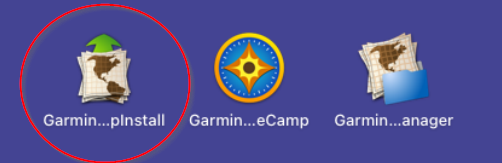
2.)Garmin Mapinstall will open and list any connected GPS device.

When you see your device in the list you can click Continue

[![Digi-watch1.png](https://brmb.support/uploads/images/gallery/2025-03/scaled-1680-/digi-watch1.png)](https://brmb.support/uploads/images/gallery/2025-03/digi-watch1.png)
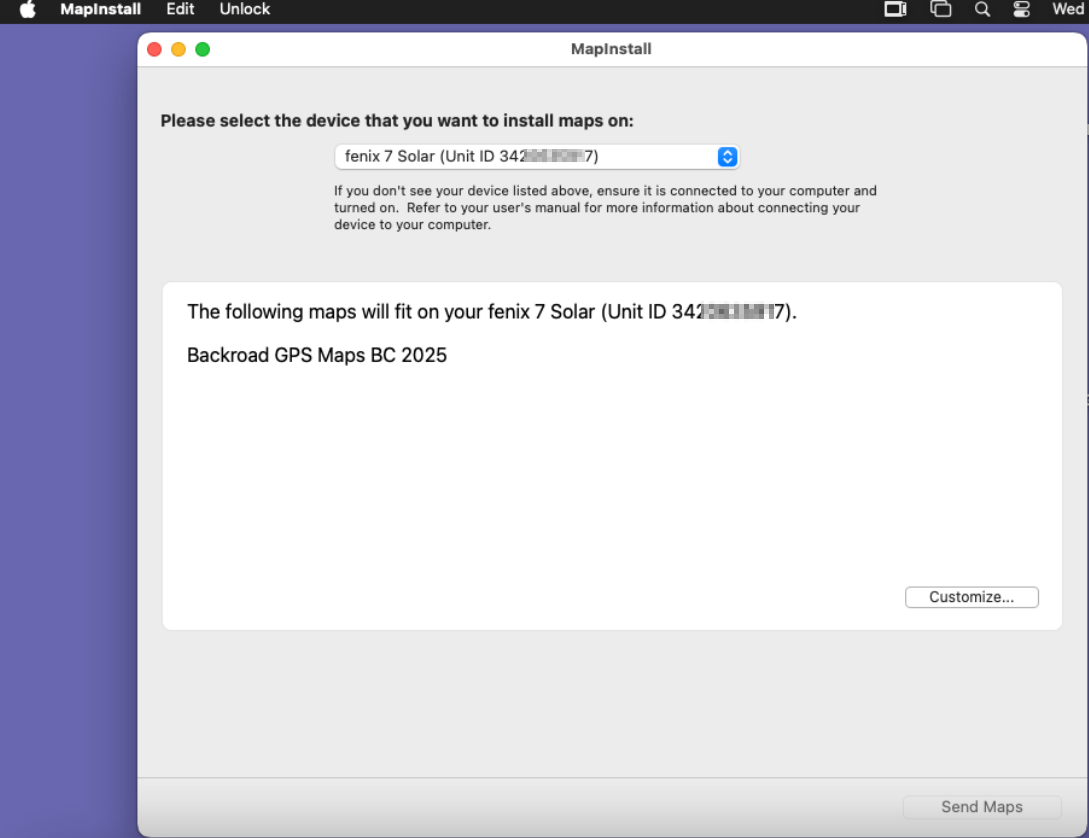
3.)You can click Customize if you want to select a custom area.

[![Digi-watch3.png](https://brmb.support/uploads/images/gallery/2025-03/scaled-1680-/digi-watch3.png)](https://brmb.support/uploads/images/gallery/2025-03/digi-watch3.png)
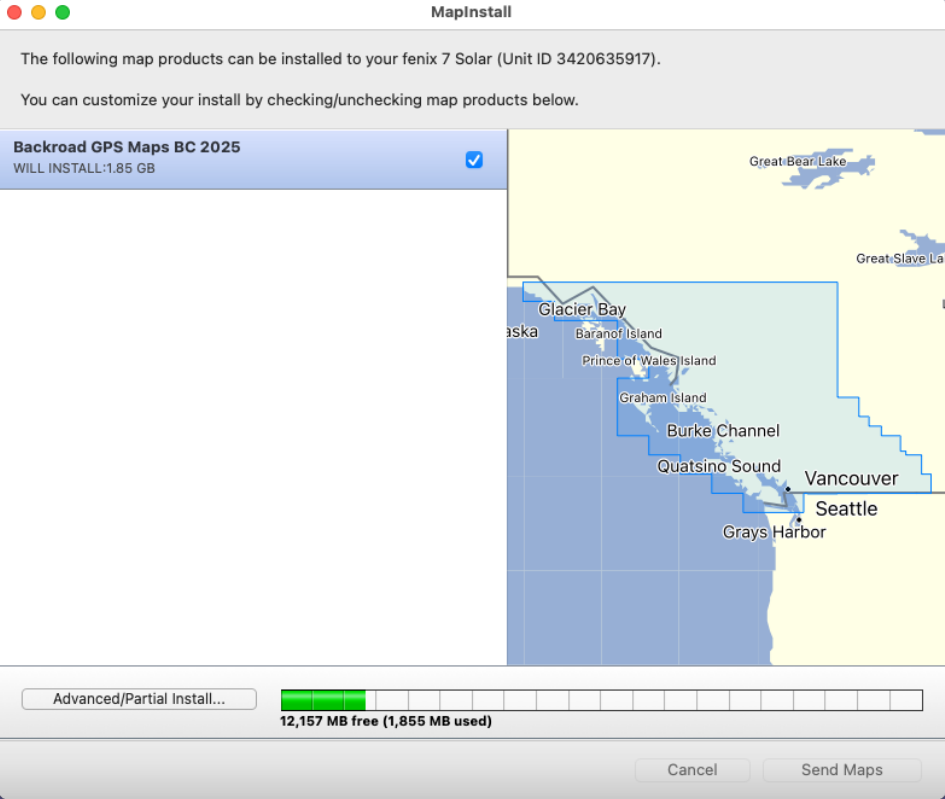
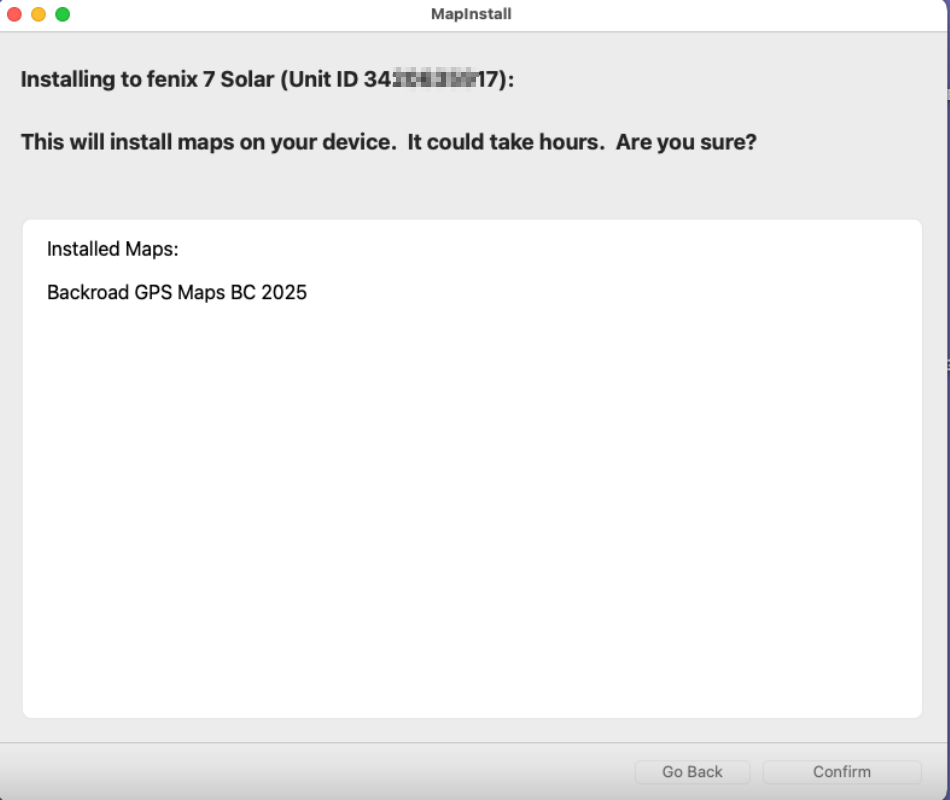
4.) Click on Send Maps to start transfer of the maps.

Click Confirm to begin the transfer

[![Digi-watch4.png](https://brmb.support/uploads/images/gallery/2025-03/scaled-1680-/digi-watch4.png)](https://brmb.support/uploads/images/gallery/2025-03/digi-watch4.png)
[![Digi-watch6.png](https://brmb.support/uploads/images/gallery/2025-03/scaled-1680-/digi-watch6.png)](https://brmb.support/uploads/images/gallery/2025-03/digi-watch6.png)
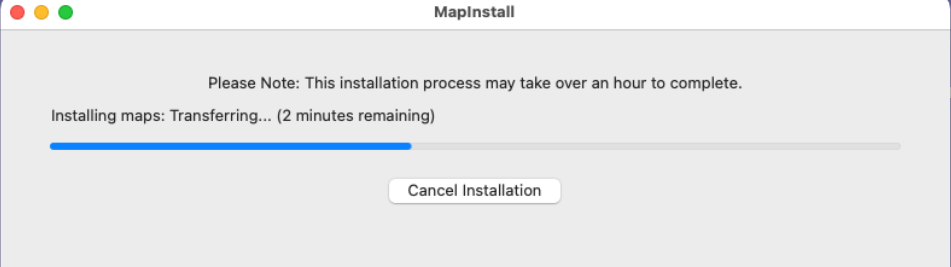
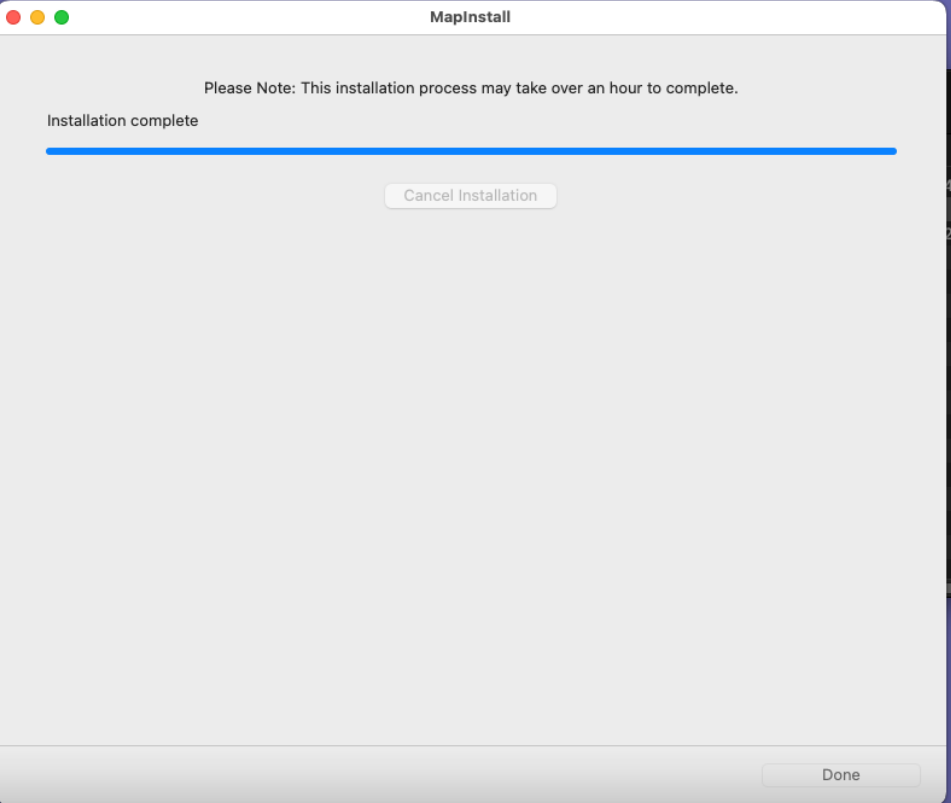
4.)Click Done to complete the Map transfer.

[![Digi-watch7.png](https://brmb.support/uploads/images/gallery/2025-03/scaled-1680-/digi-watch7.png)](https://brmb.support/uploads/images/gallery/2025-03/digi-watch7.png)
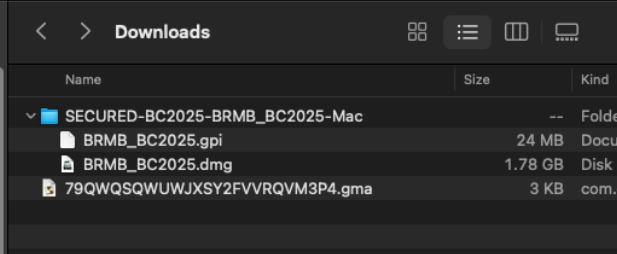
### <span style="text-decoration:underline;">***INSTALL the .gpi POI file***</span>

1.)Copy the **.gpi** file located in the map installer folder you downloaded.

[![Digitalupdate11.png](https://brmb.support/uploads/images/gallery/2025-03/scaled-1680-/digitalupdate11.png)](https://brmb.support/uploads/images/gallery/2025-03/digitalupdate11.png)
2.) Paste the .gpi file into the POI folder located inside the GARMIN folder on the GPS unit

***If the POI folder does not exist in the Garmin folder you can create it.***

***[![Digitalupdate23.png](https://brmb.support/uploads/images/gallery/2025-03/scaled-1680-/digitalupdate23.png)](https://brmb.support/uploads/images/gallery/2025-03/digitalupdate23.png)***
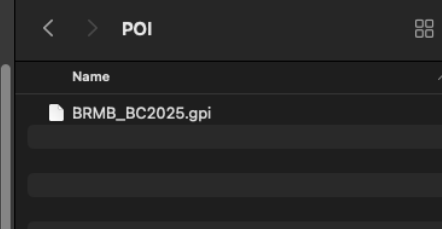
***3.)You can now unplug the GPS and test that the maps are loading.***

# Troubleshooting [MAC]

Connecting Your Garmin GPS to a Mac:

Macs with M1 and newer processors do not work well with the following GPS models:

- BMW Motorrad Navigator V and VI
- Camper
- dēzl
- dēzlCam
- DriveLuxe 5x
- Drive(Smart)
- nūviCam
- Overlander
- RV
- zūmo 59x.
- Zũmo XT/XT2

If you connect the device directly to the Mac, it will not communicate.

> Connect the device to a USB 2.0 hub and then connect it to the Mac (if necessary with an additional USB-A to USB-C adapter)  
> [https://support.garmin.com/en-US/?faq=Pu8dqQaIFY5hq2dMWuDix7](https://support.garmin.com/en-US/?faq=Pu8dqQaIFY5hq2dMWuDix7)

More and more Garmin devices are released that only support the Media Transfer Protocol (MTP), like the Zũmo XT, and most recent Camper and Drive(Smart) models, but also various fitness and training watches. Apple does support MTP, but not optimal.   
Only one program can simultaneously communicate with the device, to other programs the device is not discoverable while the first program is active. (\*Always close Garmin Express)

MTP devices will also not show up in MAC's Finder.  
To allow access to these devices you can try installing the FREE OPENMTP app:  
https://openmtp.ganeshrvel.com